
There’s a strange moment that happens when a new feature arrives on your phone—one you didn’t exactly ask for but end up exploring out of curiosity. A notification pops up, or someone casually mentions it, and suddenly you’re diving into settings you’d never opened before. That’s the feeling many users describe when they first start exploring how to use Apple Intelligence on their devices. It isn’t loud. It doesn’t scream for attention. But once you notice it, something shifts in how you think about everyday tasks.
Apple’s new intelligence system isn’t designed to feel like an external assistant watching over you. Instead, it blends quietly into your routine. Small things start becoming easier without you even realizing the mechanism behind them. Summaries feel tighter, writing suggestions feel strangely accurate, and simple context-based recommendations appear at just the right time. And if you’re holding one of the newer devices—like the Apple iPhone 15—the whole experience feels smoother, more deliberate, almost like the phone is trying to understand your rhythm instead of forcing its own.
People often underestimate how subtle the difference can be between a smart feature and a truly intelligent one. Smart features require your tap. Intelligent ones show up before you even think of tapping. Some users describe it as my phone reading my mind—not in the creepy way, but in that deeply convenient way where technology finally aligns with human habits instead of the other way around.
But with every new Apple feature, there’s also the question of availability. Early rollouts tend to skip regions, and users in India often ask whether features like Apple Intelligence India will take time, arrive partially, or land all at once. That anticipation creates its own energy. People scroll forums, watch tiny YouTube demos, read first impressions, and compare notes—even before the update reaches them.
So, let’s dive into the bigger picture: how these intelligence features work, what they change, how you can use them effectively, and why they represent a shift from Apple’s usual approach.
Understanding The Foundation Of Apple Intelligence
Apple didn’t frame this new intelligence system as a single feature. It’s more like a layer that sits quietly across apps, messages, suggestions, and system functions. Instead of relying entirely on cloud processing, it uses on-device models to keep data private while still delivering clever assistance.
What feels different is the subtlety. You don’t always notice when it’s active. A cleaner summary here, a better draft suggestion there—it feels more like gentle polishing rather than intrusive automation.
Why The iPhone 15 Experience Feels Sharper
Users who’ve tested the features early on have mentioned how the Apple Intelligence iPhone 15 handles suggestions more seamlessly compared to older devices. Part of that comes from the hardware jump; part of it comes from software tuning.
On the iPhone 15, transitions between tasks feel smoother. When writing an email, drafting notes, or rearranging thoughts, you sense the device responding with a kind of quiet awareness. Not perfect. But noticeably different.
Small Interactions That Feel Surprisingly Helpful
Sometimes intelligence doesn’t need to be grand. It shows its value in tiny, everyday interactions. For example, when you type a long message, the system may offer a clearer version without sounding robotic. Or when you’re skimming a lengthy article, a neatly condensed summary appears at the perfect moment.
These micro-moments build up. You start expecting your phone to reduce effort, even in areas you normally never thought about.
Rewriting And Summarizing Made Easier
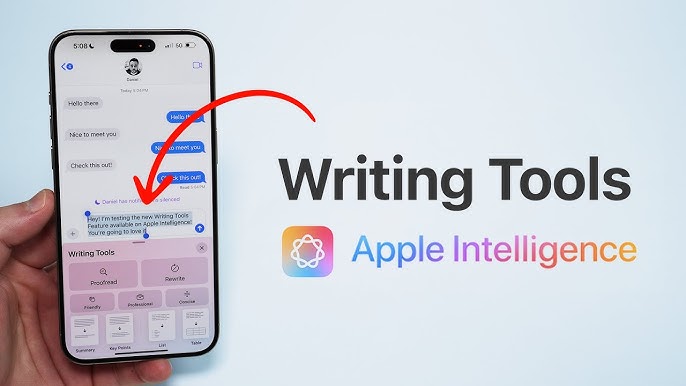
One of the strongest use cases appears in writing. Emails, texts, notes—everything feels easier when the system helps refine your thoughts. If you’ve ever stared at a message thinking, This sounds too formal, or This feels too casual, the rewriting option solves that instantly.
It’s not just about grammar. It’s about tone. And tone is where intelligence makes the interaction feel more human.
Visual Understanding And Smarter Suggestions
Phones have long recognized objects and scenes, but intelligence adds context. Instead of just identifying items in an image, it may help categorize them or connect them to relevant tasks. Searching within your photo library feels faster because results feel more aware.
Imagine searching the book I bought last week and actually getting the right image. That’s the level of refinement users are beginning to notice.
How To Get Started Without Feeling Overwhelmed
People often assume new AI features require deep learning or endless setups. But discovering how to use Apple Intelligence actually feels more like a slow unfolding. You start with writing tools. Then summaries. Then a few suggestion panels. Nothing forces itself on you.
Take it one interaction at a time. The system adapts as you explore. And as it learns your patterns, new suggestions start appearing more naturally.
The Question Of Availability In India
A recurring question in tech communities is whether users will get immediate access to intelligence features in India. Conversations around Apple Intelligence India often revolve around early beta releases, regional restrictions, and phased rollouts.
India’s large user base plays a role. Apple sometimes releases features slightly later due to language models, regulatory adjustments, or infrastructure readiness. But historically, once features arrive, they arrive polished.
Balancing Intelligence With Privacy
Apple built its reputation on user privacy, and with intelligence features, this becomes even more important. Instead of sending data constantly to the cloud, much of the processing stays on-device.
This balance—intelligence without oversharing—is a major reason users feel more comfortable experimenting with the new system. It feels thoughtful rather than intrusive.
Why Users Feel More Connected To Their Devices Now
When your phone behaves in a way that aligns with your mental flow, something shifts. You don’t think of it as a tool anymore. You think of it as an assistant—not dramatic or flashy—but steady, predictable, and quietly reliable.
That emotional shift is significant. It changes how people interact with their devices daily, reducing mental friction and making routines smoother.
What The Future Could Look Like For Apple Intelligence
The initial rollout is just the beginning. Future updates will likely refine tone adjustments, expand visual understanding, deepen cross-app intelligence, and introduce features that feel almost conversational.
If Apple continues aligning intelligence with user behavior rather than forcing users to adapt, the technology will feel even more natural with time.
Conclusion
Apple’s new intelligence features introduce a smoother, more intuitive way of interacting with everyday tasks. Whether people explore how to use Apple Intelligence, look for region updates around Apple Intelligence India, or experience deeper integration on devices like the Apple Intelligence iPhone 15, one thing becomes clear: intelligence, when done right, doesn’t shout. It blends. It softens friction. And it quietly transforms how people use their phones day after day.