
When you think about email, most people instantly think of Gmail or Outlook. They’re everywhere. But if you’ve been exploring alternatives, chances are you’ve stumbled across Zoho Mail. And then the questions start popping into your head. How do you even set up an account? Is it really free, or is there some hidden catch? And perhaps most importantly, can it actually be trusted for serious communication?
I had these exact questions when I first tested Zoho for myself. The signup process seemed straightforward, but I wondered, Is this really enough for business use? After all, we’ve all been burned before by platforms that sound promising but fall flat once you dive in. That curiosity also led me down a rabbit hole—what are the disadvantages of Zoho? Where does it shine, and where does it stumble?
Something else that surprised me was discovering Zoho’s roots. You might not know this, but Zoho is an Indian company, and it has built quite a global reputation over the years. That brings another layer of curiosity. If an Indian-founded company has gone global, it must be doing something right, right?
And let’s be honest, the safety of your data is everything when it comes to email. Many of us have grown skeptical of big tech’s use of our inboxes. So, the question remains—Is my data safe with Zoho? It’s worth unpacking this because data privacy isn’t just some buzzword. It affects your trust in the service.
Before we get lost in these questions, let’s start from the very beginning. We’ll walk through account creation, explore whether Zoho Mail is truly free, examine what it’s used for, uncover drawbacks, and tackle the big questions about trust and safety. Along the way, you’ll get my own impressions, the little quirks I noticed, and maybe some surprises that might help you decide if Zoho Mail fits your needs.
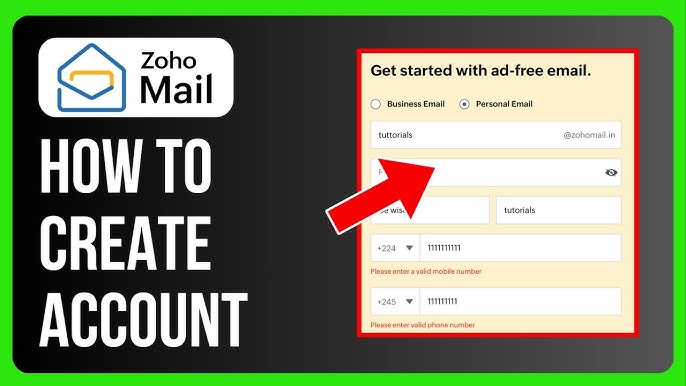
How To Create A Zoho Email Account
Getting started with Zoho Mail doesn’t require any advanced skills. You visit the Zoho website, click sign up, and you’ll be asked for your name, phone number, and a few simple details. Within minutes, you’re looking at a clean, minimal inbox ready to use.
For businesses, the setup can extend to custom domains, allowing teams to have professional email addresses linked to their brand. When I set up my first Zoho Mail account, I remember thinking how surprisingly smooth the onboarding was compared to other business email tools.
Is Zoho Email Really Free
Yes, there is a free plan. And it’s not a trial that runs out in 30 days—it’s genuinely free for personal use. You don’t get all the bells and whistles that come with the premium packages, but you do get enough to manage emails comfortably.
This makes Zoho particularly appealing to freelancers or small businesses trying to cut costs. That said, upgrading opens up bigger storage, business features, and better integration with Zoho’s wider suite of tools. So while free is good, paid is often necessary for growing teams.
Is Zoho Mail Trusted
Trust is something Zoho has carefully cultivated. Unlike Gmail, which is tied into Google’s advertising ecosystem, Zoho positions itself as privacy-first. The company openly says it doesn’t scan your emails for ads. That alone builds confidence.
I’ve personally felt more comfortable knowing that client conversations are not being analysed for marketing data. And Zoho’s growing adoption across global companies reinforces that trust isn’t just marketing fluff—it’s being lived out in real use cases.
What Are The Disadvantages Of Zoho
No service is perfect. Zoho Mail has its downsides. For one, the interface—while clean—sometimes feels less intuitive compared to Gmail’s polished design. Then there’s the ecosystem issue.
If you’re already tied into Google services, switching to Zoho might feel like a step back because integrations outside Zoho’s suite are limited. And, let’s be honest, explaining to clients that your email is on Zoho instead of Gmail can sometimes bring up questions. These small friction points can matter, depending on how you work.
What Is Zoho Mail Used For
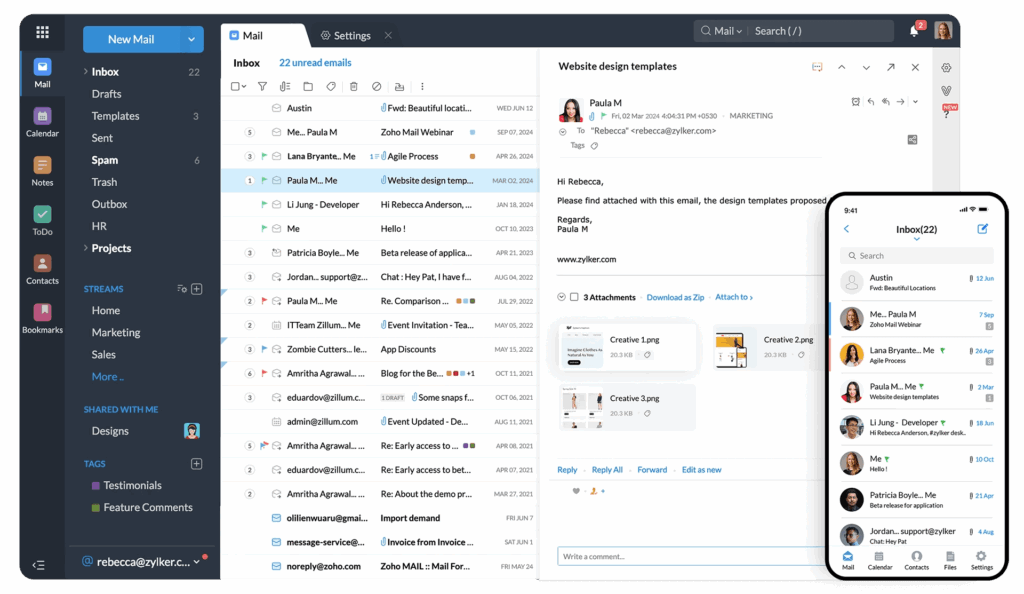
Zoho Mail is used by individuals, freelancers, and businesses alike. For personal use, it’s a free, ad-free alternative to Gmail. For businesses, it becomes part of the Zoho Workplace suite—alongside apps like Zoho Writer, Zoho Cliq, and even CRM tools.
In practice, it’s not just about sending and receiving emails. Teams can collaborate, schedule meetings, share files, and create structured workflows inside Zoho’s environment. When I tested it with a small project team, it felt less like just email and more like a hub for communication.
Is Zoho An Indian Company
Yes, Zoho is indeed an Indian company, founded in Chennai and later expanding its presence globally. This surprises a lot of people who assume all big tech players come from Silicon Valley.
The Indian roots actually shape Zoho’s philosophy—focusing on affordability, independence from big tech influence, and building a broad ecosystem that doesn’t rely heavily on outside companies. It’s a success story that adds credibility, showing how innovation can thrive outside the US-dominated tech scene.
Can I Use Zoho Mail In Gmail
Absolutely, you can. If you love Gmail’s interface but want to keep a Zoho Mail address, you can configure Gmail to fetch Zoho Mail via IMAP or POP settings. This way, all your Zoho messages flow into Gmail, and you don’t have to log into two inboxes separately.
I once set this up while testing Zoho Mail, and it honestly worked better than I expected. This flexibility is useful for people who want to try Zoho without giving up the Gmail familiarity they’re used to.
Is My Data Safe With Zoho
This is one of the most important concerns for anyone considering Zoho. The company strongly emphasises data protection, encryption, and compliance with privacy regulations.
Unlike ad-driven services, Zoho doesn’t rely on monetising your inbox content. For many users, this is the dealbreaker in favour of Zoho. Personally, I felt reassured knowing that sensitive emails weren’t part of a massive advertising pipeline. Of course, no system is flawless, but Zoho’s track record in prioritising privacy is far stronger than some competitors.
Comparing Zoho To Bigger Players
While Zoho may not yet be as universally known as Gmail or Outlook, it has carved a niche. It’s often chosen by businesses that value privacy and cost savings.
Gmail dominates in integrations and user familiarity, while Outlook is deeply tied to Microsoft’s corporate ecosystem. Zoho finds its place by offering an independent, ad-free option that doesn’t compromise too much on features. The trade-offs are real, but for many, the benefits outweigh the rough edges.
Final Thoughts On Choosing Zoho Mail
At the end of the day, Zoho Mail isn’t trying to be Gmail. It’s carving its own space. For some, that’s exactly what makes it appealing.
If you want a free, privacy-friendly email with business growth potential, Zoho is a strong contender. But if you’re after seamless integration with non-Zoho tools or crave the most polished design, Gmail and Outlook may still be ahead. The choice comes down to what you value most—control, cost, or convenience.
Conclusion
Zoho Mail is a service built around privacy, affordability, and business focus. Yes, it’s free at the personal level, and yes, it’s trustworthy enough for professional use. Like any service, it has drawbacks—mainly around integrations and familiarity—but for those seeking a clean, ad-free experience, it stands out. Being an Indian company that’s gone global only adds to its credibility. If you’re considering Zoho Mail, weigh your needs carefully, and you might just find it’s exactly the fit you’ve been looking for.