
Work today is noisy. Not loud in the audio sense, but mentally loud. Messages everywhere. “Quick call?” pings. Emails that should’ve been one line. Random screenshots flying around. And if you’ve ever tried keeping track of it all with WhatsApp groups or long email chains… You already know the pain. Stuff gets lost. People repeat questions. Decisions disappear inside threads that nobody reads again.
That’s the space Slack stepped into.
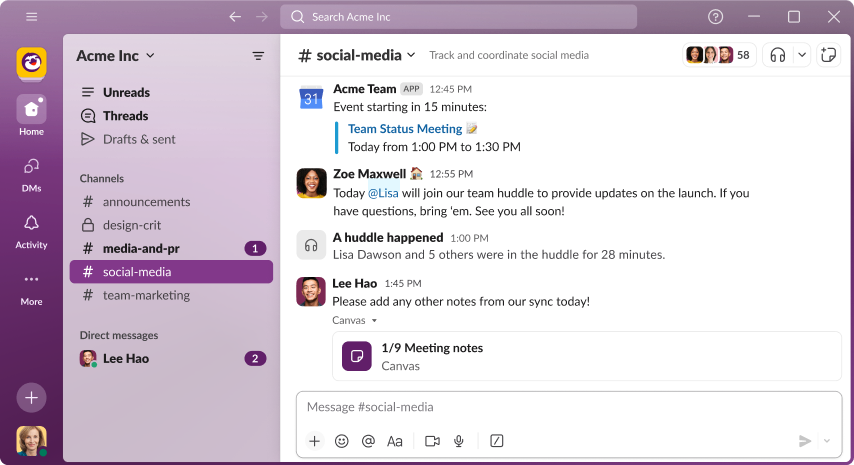
If you’re new to Slack, it can feel deceptively simple at first. You open it, see a sidebar, a few channels, some names, and a message box. That’s it. But then you notice people using it in a more structured way, almost like a workplace operating system. A channel for announcements. A channel for client issues. A channel for fun memes. And suddenly the chaos gets a shape.
So, what is the Slack app really? At its core, it’s a team messaging platform built for organized communication. It’s not exactly email, not exactly a group chat. It’s closer to a digital office space, where conversations are sorted by topic instead of being dumped into one endless stream.
And if you’re wondering whether Slack is only for tech companies, not really. It’s used by agencies, schools, HR teams, customer support groups, startup founders, content creators, and even event planners.
Anywhere people need to coordinate. Anywhere updates matter.
In this guide, we’ll go deep, but in a calm way. You’ll learn what Slack is, how people actually use it without overcomplicating things, how polls work, what those emoji reactions really mean (yes, even the palm tree), and how free vs paid Slack feels in real life. Not theory. The practical stuff that saves time, and makes you look like you “get it.”
What Slack Is Designed To Replace (And Why It Works)
Slack didn’t become popular just because it’s another messaging app. It became popular because it fixes something that’s been broken for years: workplace communication scattered across too many places.
Think about the traditional office setup. You had meetings for decisions. Emails for approvals. Maybe a shared drive for documents. But as remote work increased, everything blended. Conversations moved to chat apps. People started sharing files inside chats. Then someone asked a question, and it got buried. Then the same question came again two days later.
Slack solves this by making “where” you talk matter as much as “what” you say.
A channel acts like a room with a purpose. When work is discussed inside a channel, new people joining the project can scroll up and understand context. You don’t have to forward ten emails. You don’t have to paste the same update three times. It’s already there.
And Slack also reduces “reply-all” chaos. Instead of email chains with 15 people, you have one thread, one place. Clean. Less noise.
Of course, it still depends on how your team behaves. Slack won’t magically force people to be organized. But it gives the structure that makes organized communication possible. That’s the reason it sticks.
Who Owns Slack And Why That Matters In 2025 Work Culture
A lot of users randomly search who owns Slack when they’re deciding whether to adopt it seriously. It’s a fair question. People want to know if the tool will be supported long-term, updated regularly, and integrated with other business software.
Slack is owned by Salesforce, which is one of the biggest enterprise software companies in the world. That matters because it influences Slack’s direction: deeper integrations, stronger security options, more features for large teams, and more focus on business workflows.
Now, you don’t need to be a Salesforce customer to use Slack. Most teams are not. But ownership shapes the product philosophy. It explains why Slack keeps leaning into things like automation, enterprise controls, and integration with productivity stacks. Slack isn’t trying to be a “fun chat app.” It’s trying to be workplace infrastructure.
And honestly, that’s a good thing for most companies. It means Slack is built to handle scale. A team of 5 can use it. So can a company with 5,000 employees. Same idea. Different intensity.
How Slack Works Inside A Team (The Channel Mindset)
People don’t struggle with Slack because it’s complicated. They struggle because they carry old habits into it. If someone treats Slack like WhatsApp, everything becomes messy fast.
Slack works best when you treat channels like categories, not groups.
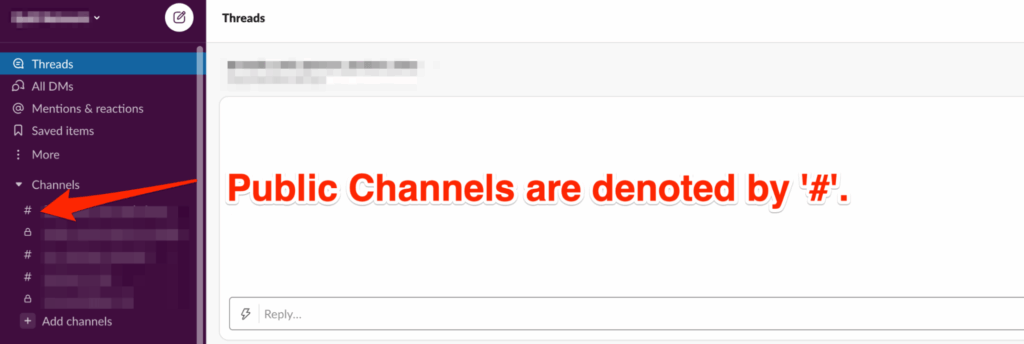
For example, a marketing agency might have channels like #client-xyz, #creative-review, #campaign-updates, #admin, and #random. A product team might have #engineering, #bugs, #design, #standup, #releases. The names can vary, but the idea stays the same: topic-based rooms.
Once you understand that, Slack becomes easy.
You post updates inside the channel that matches the topic. Suppose it’s a quick question for one person, you DM. If it’s an update everyone should know, you post in the shared space. If a conversation becomes long, you use threads so the channel doesn’t look like a flooded comment section.
Over time, the channel becomes a living log of decisions. That’s the secret benefit people don’t talk about enough. It’s not just chat. It’s searchable team memory.
And yes, Slack search can be weirdly powerful. You can find an old file, a message, a link, even a phrase someone typed months ago. That alone saves time.
How To Use Slack Without Feeling Overwhelmed On Day One
If you open Slack for the first time and think, “Okay… what now?” you’re not alone. The best approach is not to explore every feature. Just build a comfortable routine.
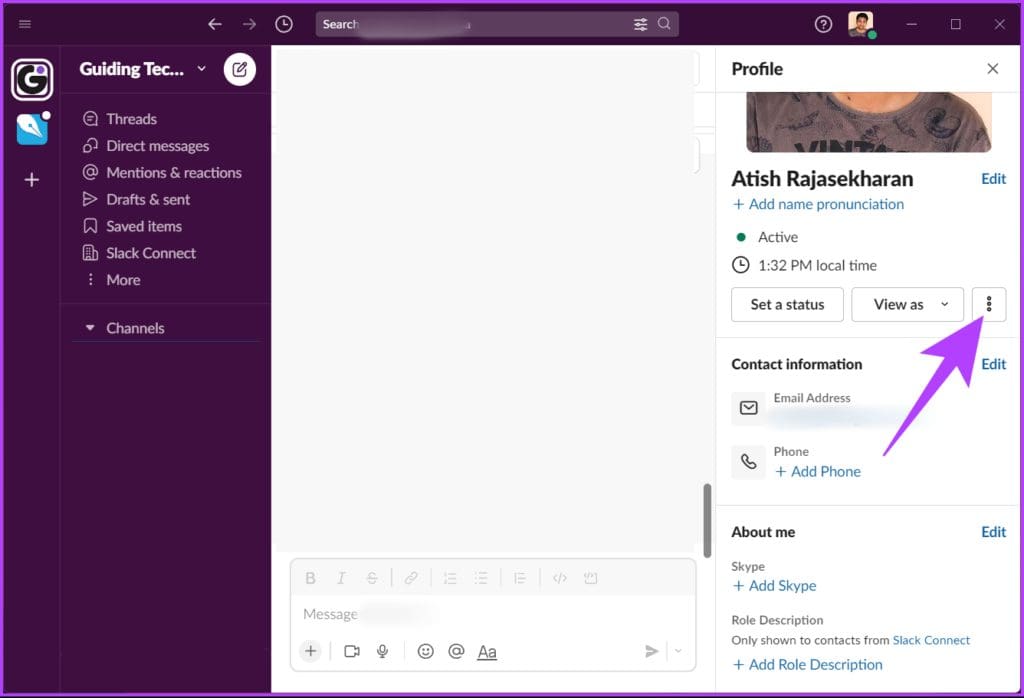
Start with your sidebar. The sidebar is your map. Channels and DMs live there. Pin the channels you actually need. Mute the ones that are too noisy. It’s fine. You’re not being rude. You’re being functional.
Next, focus on reading patterns. Slack has channels where people expect discussion, and channels where people expect updates only. You can usually feel the vibe within a day. Some channels are loud. Some are quiet but important. Pay attention to the quiet-important ones.
Then, learn the two most life-saving actions: reply in thread and react with emoji. Threads keep channels clean. Emoji reactions reduce unnecessary “okay” or “done” messages.
When people ask how to use Slack, what they usually mean is: “How do I stop it from becoming chaos?” And the answer is: use threads and channels properly, and don’t reply to everything like it’s an urgent alarm.
Also, notifications matter. Set them early. Otherwise, Slack feels like a constant interruption machine. You can control alerts per channel, per keyword, and per mention. That’s what makes Slack usable long-term.
Is Slack Free, and What You Actually Get Without Paying
A big question is whether Slack is free. Yes, Slack has a free plan. Many teams run on it, especially small groups, early startups, student projects, or temporary collaborations.
The free plan generally gives you the main experience: channels, messaging, basic organization, and integrations (with limits). You can set up a workspace, invite people, create channels, and start working immediately. For a lot of users, that’s enough.
But teams usually upgrade when they hit limitations around message history, storage, or feature depth. The exact limitations can change over time, but the bigger idea stays the same: free Slack is great for starting, paid Slack is for scaling.
Still, free Slack isn’t “demo mode.” It’s a real working tool. You can run projects on it. You can onboard a team. You can manage tasks informally. It’s not a toy.
If you’re a solo person or a small team, the free plan can feel surprisingly complete. The key is to set expectations: don’t treat Slack as your permanent archive unless you’re on a plan that supports deeper history. Treat it as a workspace. A working area.
How To Create A Poll In Slack Without Using Extra Tools
At some point, every team needs a quick decision. Pick a meeting time. Decide on a theme. Choose between two options. And nobody wants to create a Google Form for that. Too slow.
So people search for how to create a poll in Slack, hoping there’s a built-in button. Slack doesn’t always have one universal built-in poll feature in every setup, but polls are still easy to do in Slack in a natural way.
One common method is using emoji reactions. Someone posts, “Option A 👍 Option B 👎,” and team members vote with reactions. It’s quick, visual, and doesn’t clutter the channel with replies. You can do it in under 10 seconds.
Another method is using a poll app integration. Many workplaces install dedicated polling apps that let you create structured polls inside channels. That gives you multiple choice options, anonymous voting (sometimes), and cleaner results.
But even without integrations, you can still poll like a human. Use a message format that’s clear, short, and time-bound. For example: “Vote by 4 PM. React with ✅ for Monday or 🕒 for Tuesday.” It works.
This is one of those Slack habits that feels small but saves real time, especially in teams where decisions are constant.
How To Do A Poll In Slack When You Want Cleaner Results
Now, if you want to do polls regularly, you might want something more consistent than emoji voting. That’s where people ask how to do a poll in Slack in a more serious way.
A clean poll needs three things: context, options, and a deadline.
Context matters because people don’t vote when they don’t understand what they’re voting for. Options matter because vague choices lead to confusing results. And deadlines matter because Slack is fast-moving—if you don’t set a time limit, half the team will see it late.
A good poll message might look like this in normal text form: “Quick vote for Friday’s session topic.
- Option 1: SEO Basics.
- Option 2: Paid Ads.
- Option 3: Content Strategy. Vote today before 6 PM.”
Then you choose a voting style: reactions, replies, or poll integration. Reactions are best for speed. Replies are best when people need to explain their vote. Poll integrations are best when you want a clean summary.
Also, polls work best when you post them in the right channel. If you post in #random, people treat it like a joke. If you post in a focused channel, people vote seriously. Channel tone matters more than people admit.
And here’s a small trick: pin the poll if it’s important. Slack pins make it harder for the message to disappear into the scroll.
What A Palm Tree Emoji On Slack Usually Means In Conversations
Now for the fun one. People see certain emoji reactions and get confused, and suddenly they’re googling what a palm tree emoji on Slack means. Because emojis in Slack aren’t always literal, they’re cultural.
A palm tree emoji commonly signals something like: vacation mode, time off, relaxed vibes, travel, or “I’m out for the day.” It can also be used as a playful reaction to a message that feels chill, like “Let’s keep it light today” or “We’ll handle this after the weekend.”
But it can also be team-specific. Some workplaces create their own emoji language. Palm tree could mean “approved,” “ship it,” “done,” or “cool idea,” depending on team history. Slack emoji use is basically mini culture-building.
If you’re unsure, look at patterns. Who uses it, and when? If your manager reacts with 🌴 to “I’m taking leave tomorrow,” it likely means “enjoy.” If your teammate reacts with 🌴 to “client wants changes again,” it might mean “we need a break.” Same emoji, different tone.
The bigger lesson is: Slack reactions are shorthand. They’re not random. They reduce message clutter and add emotion without extra typing. The palm tree emoji is just one of the many little symbols teams use to stay human inside work.
Best Slack Habits That Make You Look Like A Pro Fast
There’s a certain “Slack confidence” you can spot immediately. Not because someone types faster, but because they use the platform cleanly. And the truth is, anyone can do it with a few habits.
One habit: keep messages structured. Not long essays. But a clear opening line, then the details. People skim Slack. They don’t read it like a blog. If your message is readable, you get faster replies.
Another habit: use threads. Threads keep channels focused. Without threads, important channels become unreadable. With threads, everything stays organized. It’s one of those boring features that makes a huge difference.
Also, learn the difference between a channel update and a DM. If something is useful for everyone later, post it in the channel if it’s only relevant to one person, DM. This prevents knowledge from getting trapped in private chats.
And don’t underestimate the power of emoji reactions. A simple ✅ can replace “Okay, noted.” A 👀 can replace “I’m looking into this.” A 🙌 can replace “Great job.” Less typing, more flow.
Slack is a tool, but it’s also a social environment. If you communicate clearly and respectfully, people respond better. Work becomes smoother. And that’s really the whole point.

Conclusion
Slack works best when you treat it like a structured workspace, not just another chat app. Once channels, threads, and simple polls become part of your routine, communication feels calmer, and decisions become easier to track. Whether you’re using the free plan or joining a large company workspace, Slack can help teams stay aligned without constant meetings. And yes, even emoji culture has meaning, including that palm tree reaction that quietly signals breaks, travel, or relaxed energy.