
Every website on the internet has an address, and that address is what allows a browser to find the correct destination. Whether it is a homepage, a product page, a news article, an image or a downloadable document, there is usually a specific web address associated with it. This address is called a URL.
The term what is a URL may sound like a basic technical question, but understanding it is useful for everyday browsing as well as website management. A URL can reveal the website’s domain, the location of a particular page and, in some cases, additional information about what the page is supposed to display. It can also help users identify suspicious links before opening them.
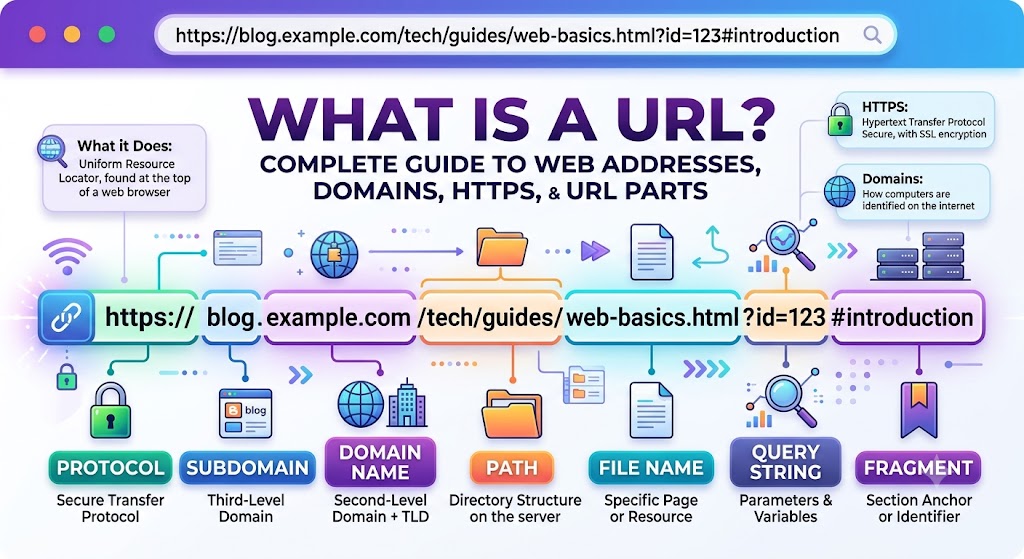
A URL is commonly called a web address, but a complete URL can contain much more than the name of a website. It may include a protocol, subdomain, domain, path, query parameters and a fragment. Each component has a specific purpose, and together they tell the browser how to locate and request the desired resource.
What Does URL Stand For?
URL stands for Uniform Resource Locator. In simple terms, it is a standard way of identifying the location of a resource available on a network, particularly on the World Wide Web.
The word “locator” is the easiest part to remember because a URL essentially tells software where a resource can be found. A web browser uses that information to reach the requested destination.
For example:
is a URL that can point to the main page of a website.
A more specific address might be:
In this case, the URL points to a particular page rather than simply identifying the site’s homepage.
URLs can also point to resources that are not ordinary webpages. They may identify images, PDFs, videos, downloadable files or specific locations within a webpage.
This is why a single website can have hundreds, thousands or even millions of URLs.
What Is a URL in Simple Terms?
The simplest web address meaning is “the address of a resource on the internet.”
When someone asks for the website address of a business or an article, they are usually asking for its URL. Typing that address into a browser’s address bar can take the browser directly to the specified destination.
For example, a website might have these addresses:
- https://example.com
- https://example.com/about
- https://example.com/products
- https://example.com/blog/article
All four addresses can belong to the same website, but each can represent a different location or resource.
This structure is what makes the web organised. A domain identifies the broader website, while additional parts of the URL help identify individual pages and resources within it.
URLs are also important because they make online content shareable. When a specific article, product or document needs to be sent to another person, its URL can usually be copied and shared without requiring the recipient to navigate through the site’s homepage manually.
URL vs Web Address vs Domain Name
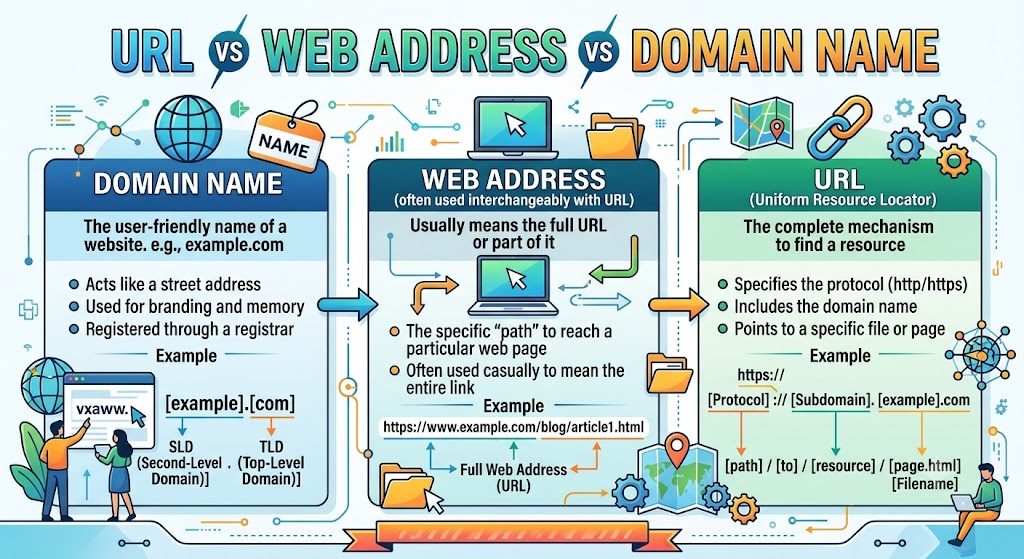
URL, web address and domain name are often used as if they mean exactly the same thing. In everyday conversation, this rarely causes confusion, but there is a technical difference between them.
A URL is the complete address of a resource.
A web address is the common term people use for a URL.
A domain name is one part of that URL and identifies the website or domain space.
Consider this example:
The complete string is the URL.
example.com is the main domain.
blog.example.com is the host, which contains the blog subdomain.
The distinction becomes particularly important when discussing website structure, redirects, SEO and online security.
A Simple Example
Suppose a company owns:
example.com
Its website might contain:
example.com/products
example.com/about
example.com/contact
The domain remains the same, but every individual page has its own URL.
In other words, a domain can contain many URLs, while a URL can provide much more information than the domain alone.
Parts of a URL
A URL is made up of different components, although not every URL contains every possible component.
Consider this example:
The address can be separated into several parts.
Protocol or Scheme
The beginning of the URL is the protocol, also called the scheme.
In this example:
https://
The protocol tells the browser how the resource should be accessed. HTTPS is now widely used for websites because it provides encrypted communication between the browser and server.
Subdomain
In the example:
blog.example.com
the blog portion is the subdomain.
Websites can use subdomains for different services or sections, such as:
- blog.example.com
- shop.example.com
- support.example.com
- mail.example.com
A subdomain is associated with the main domain but can be configured to serve a different section or application.
Domain Name
example.com
is the domain name.
The domain is usually the part of a web address that users remember most easily. Businesses often choose domains related to their brand, organisation or service.
Top-Level Domain
The .com portion is the top-level domain, commonly abbreviated as TLD.
Other examples include:
- .org
- .net
- .edu
- .gov
- .in
- .uk
Different organisations may use different TLDs depending on their purpose, location or branding.
Path
In the example:
/guides/url
is the path.
The path identifies a particular location or resource within the website. This allows one domain to contain many separate pages without each page requiring a different domain.
Query String
The section beginning with ? is the query string:
?topic=basics
Query parameters provide additional information to the website. They are frequently used for searches, filtering, sorting and other dynamic functions.
A more familiar example might be:
example.com/search?q=travel
Here, q=travel indicates the search term being requested.
Fragment
The final section:
#examples
is called a fragment.
A fragment can identify a particular section of a webpage. When the corresponding location exists on the page, the browser can move directly to that section.
URL Examples Explained
Looking at several URL examples makes the structure easier to understand.
A basic homepage URL might look like:
This contains the protocol and host but does not specify a deeper path.
A URL for a particular page could be:
The /blog/browser-guide portion identifies the specific location within the website.
An ecommerce website may use a URL such as:
Here, the path can indicate that the page belongs to the products section and relates to laptops.
A search page might use:
The query parameter gives the website additional information about what the visitor is searching for.
A page that points to a particular section might use:
The browser can use the fragment to locate the FAQ section after opening the page.
These differences show why a URL is more than simply a website name. Additional components provide increasingly specific information about the requested resource.
HTTP vs HTTPS
Two protocols commonly associated with web addresses are HTTP and HTTPS.
HTTP stands for Hypertext Transfer Protocol. It is one of the foundational protocols used for communication between web browsers and servers.
HTTPS, or Hypertext Transfer Protocol Secure, adds encryption to the connection. It is widely used for modern websites, particularly where information such as account credentials, payment details or personal data is transmitted.
An HTTPS address typically begins with:
https://
The encryption provided by HTTPS helps protect information while it travels between the browser and website.
However, HTTPS should not be confused with proof that a website is trustworthy. A fraudulent website can also use HTTPS. The domain, website identity and surrounding context still need to be checked carefully.
For online banking, shopping and other sensitive activities, users should therefore look beyond the padlock icon and examine the actual web address.
What Happens When You Enter a URL?
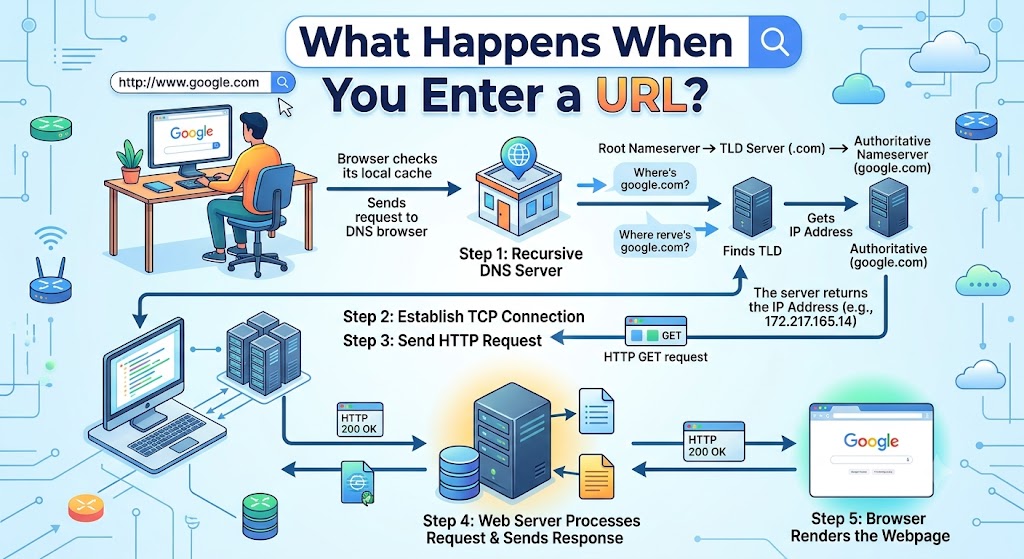
A browser performs several technical steps after a URL is entered, although most of them happen quickly enough that the process feels almost instant.
The first stage is interpreting the address. The browser identifies the protocol, domain and other components so it can determine the requested destination.
Next comes DNS resolution. Domain names are designed to be easy for people to remember, while computers communicate using IP addresses. The Domain Name System, or DNS, helps connect the domain name with the appropriate IP address.
The simplified process looks like this:
Domain name → DNS lookup → IP address
The browser can then establish a connection with the relevant server and request the resource specified by the URL.
The server returns a response, which may contain HTML as well as references to stylesheets, scripts, images, fonts and other resources. The browser processes these elements and builds the page displayed on the screen.
This entire process is one reason a URL can be thought of as more than an address. It contains the information needed to identify a destination and request a resource from it.
For a broader explanation of browser navigation, search queries and direct URL entry, see our guide on search Google or type a URL.
What Makes a URL Safe or Suspicious?
A URL can provide useful clues about whether a link deserves attention.
One of the first things to check is the domain. Fraudulent websites often use names that resemble legitimate organisations but contain small spelling changes, additional words or unusual domains.
For example, a deceptive website might deliberately use a domain that looks almost identical to a well-known company. This can make a link appear legitimate at first glance.
Phishing websites are another common concern. Such sites may imitate banking platforms, shopping websites, email services or government pages in an attempt to collect passwords, payment information or other sensitive data.
Some practical checks include:
- Examine the domain carefully before entering sensitive information.
- Look for unusual spellings or unexpected characters.
- Treat unsolicited links with caution.
- Do not assume HTTPS automatically means the site is legitimate.
- For important services, consider using a verified bookmark or manually entering the official address.
A URL that looks familiar is not necessarily safe. The complete address matters.
Absolute vs Relative URLs
Absolute and relative URLs are commonly discussed in web development.
An absolute URL contains the complete address of the resource.
For example:
https://www.example.com/images/logo.png
A relative URL provides a location in relation to the current page.
For example:
/images/logo.png
If the current site is https://www.example.com, the relative address can resolve to:
https://www.example.com/images/logo.png
Relative URLs are widely used for internal links, images, scripts and other resources because they allow website files to reference one another without repeatedly specifying the entire domain.
Absolute URLs are more useful when a complete standalone destination is needed, such as when sharing a page with someone who is not already on the same website.
Dynamic URLs and Query Parameters
Not every URL remains fixed. Many websites generate URLs dynamically based on what a visitor searches for, selects or filters.
An online store, for example, might generate a URL such as:
The query string in this example contains two parameters:
- category=phones
- sort=price
The first can indicate the selected category, while the second can determine how the products should be ordered.
Dynamic URLs are common in:
- Ecommerce websites
- Search pages
- Booking platforms
- Filtering systems
- Content management systems
- Web applications
A long URL is not automatically problematic or unsafe. Its length often reflects the amount of information being passed to the website.
For website owners, however, managing URL parameters carefully can be important for performance, crawling and search engine indexing.
Can a URL Be Changed?
Yes. URLs can change when a website reorganises its content, renames a page or moves information to a different section.
For example, a page may move from:
example.com/old-guide
to:
example.com/guides/browser-url-guide
When this happens, the website can use a redirect to send visitors from the old address to the new one.
A redirect can be represented as:
Old URL → redirect → new URL
Redirects help reduce broken links and make website migrations easier to manage.
A URL can stop working for several reasons, including a deleted page, an expired domain, a server problem, a changed website structure or a missing redirect.
A broken URL therefore does not necessarily mean that the entire website has disappeared.
Common URL Mistakes
Several URL mistakes are easy to make, particularly when dealing with unfamiliar websites.
One common error is confusing a domain name with a complete URL. A domain such as example.com identifies the website, while a URL can specify the exact page or resource.
Another problem is mistyping a domain. A single character can result in a completely different destination, which is why important web addresses should be checked carefully.
Users may also assume that the presence of HTTPS proves that a site is genuine. As discussed earlier, encryption protects the connection but does not establish the credibility of the website itself.
Long URLs can also look suspicious when they contain multiple query parameters, but length alone is not a reliable measure of safety. Many legitimate websites use complex URLs for perfectly normal technical reasons.
Finally, links received through unexpected messages should be treated cautiously. Checking the destination before submitting passwords, payment details or other sensitive information is a simple but important security habit.
How to Read a URL Before Clicking It
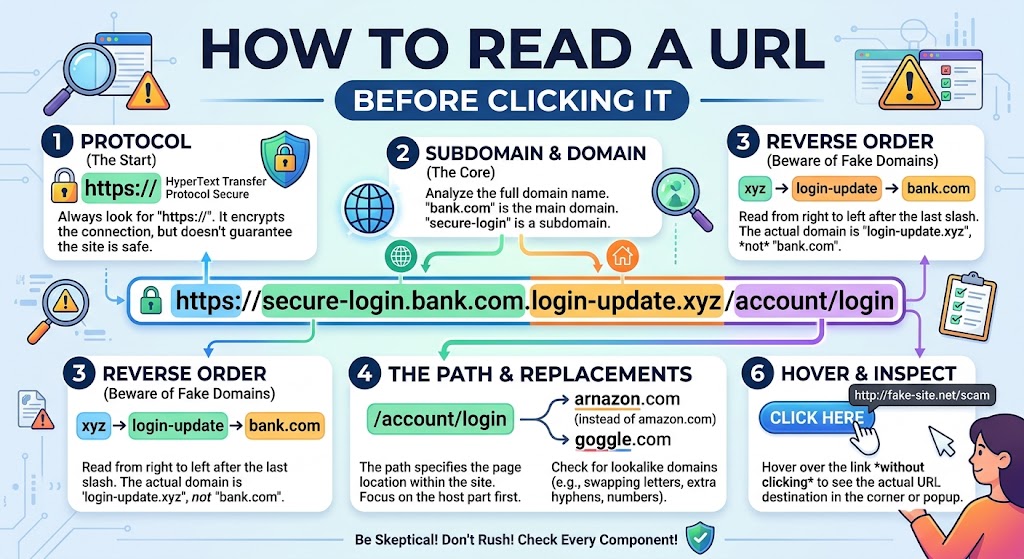
A little attention to URL structure can reveal useful information before a page opens.
Start by identifying the domain. This is usually the most important part when determining whether a website belongs to the organisation it claims to represent.
Next, look for spelling differences. Fraudulent domains often rely on small changes that are easy to overlook.
The path can also provide context. A legitimate domain does not automatically make every page or message trustworthy, particularly if the link was received unexpectedly.
For sensitive services, it is often safer to navigate using a verified official address rather than clicking a random link. Bookmarking frequently used websites can also reduce the likelihood of entering a fake or misspelled domain.
URLs and Website SEO
URLs are important in search engine optimisation because they form part of a website’s information architecture.
A descriptive URL can make it easier for visitors to understand what a page is about. For example:
example.com/blog/url-guide
is more informative than a URL made up entirely of random numbers and characters.
A well-organised URL structure can also reflect the hierarchy of a website. Sections such as:
example.com/products/phones
and:
example.com/products/laptops
make the relationship between the pages easier to understand.
Keywords can be included naturally in URLs when they accurately describe the page, but adding excessive keywords does not automatically improve search performance. Clarity, consistency and relevance are generally more useful goals.
Frequently Asked Questions
What is a URL?
A URL, or Uniform Resource Locator, is the address used to identify and access a resource on the internet. It can point to webpages, files, images, videos or other online resources.
What does URL stand for?
URL stands for Uniform Resource Locator.
What is the meaning of a web address?
A web address is a common term for a URL. It identifies the location of a website or a specific resource available online.
What is the difference between a domain and a URL?
A domain identifies the website or domain space, while a URL can include the domain as well as the protocol, path, query parameters and other information needed to identify a specific resource.
What are the main parts of a URL?
A URL can contain a protocol, subdomain, domain name, top-level domain, path, query string and fragment. Not every URL contains all of these components.
What is an HTTPS URL?
An HTTPS URL uses the HTTPS protocol, which provides encrypted communication between a browser and a website.
Does HTTPS mean a website is trustworthy?
No. HTTPS protects the connection, but it does not prove that the website or organisation behind it is legitimate.
What is a query parameter?
A query parameter is additional information included in a URL, usually after a question mark. Websites often use parameters for searches, filters, sorting and other functions.
What does the # symbol mean in a URL?
The # introduces a fragment, which can identify a particular section or location within a webpage.
Can URLs be changed?
Yes. Website owners can change URLs when pages are renamed, moved or reorganised. Redirects can be used to guide visitors from old URLs to new ones.
Why do some URLs look so long?
Long URLs may contain several path sections, query parameters or other information required by a website. Length alone does not indicate that a URL is unsafe.
What happens when a URL is entered into a browser?
The browser interprets the address, resolves the domain through DNS, connects to the appropriate server, requests the resource and processes the response to display the webpage.
What is the difference between HTTP and HTTPS?
Both are protocols used for web communication, but HTTPS adds encryption to help protect the connection between a browser and website.
Can a URL point to a file?
Yes. URLs can identify many types of online resources, including PDFs, images, videos, downloadable files and webpages.
Can two URLs point to the same page?
Yes. Websites can use redirects, alternate URL structures and other mechanisms that cause multiple URLs to lead to the same or substantially similar content.
Is a domain name the same as a website?
No. A domain is an address used to identify a website’s domain space, while the website is the collection of content and functionality accessible through it.
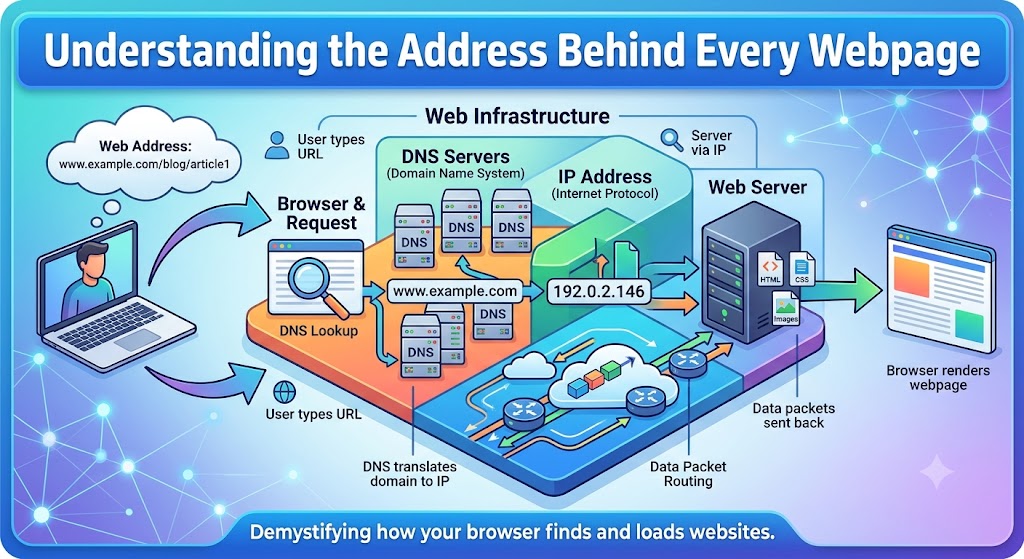
Understanding the Address Behind Every Webpage
URLs are easy to overlook because modern browsers hide much of their complexity. Yet behind every webpage is a structured address that tells the browser where to find the requested resource and how to access it.
The difference between a domain and a complete URL, the role of HTTPS, the purpose of paths and query parameters, and the way DNS connects domain names with servers all form part of that structure. Knowing these basics makes it easier to navigate websites, understand links and identify suspicious addresses.
At its core, a URL is simply a locator for something available online. Once the individual parts are familiar, even a complicated web address becomes much easier to understand.