
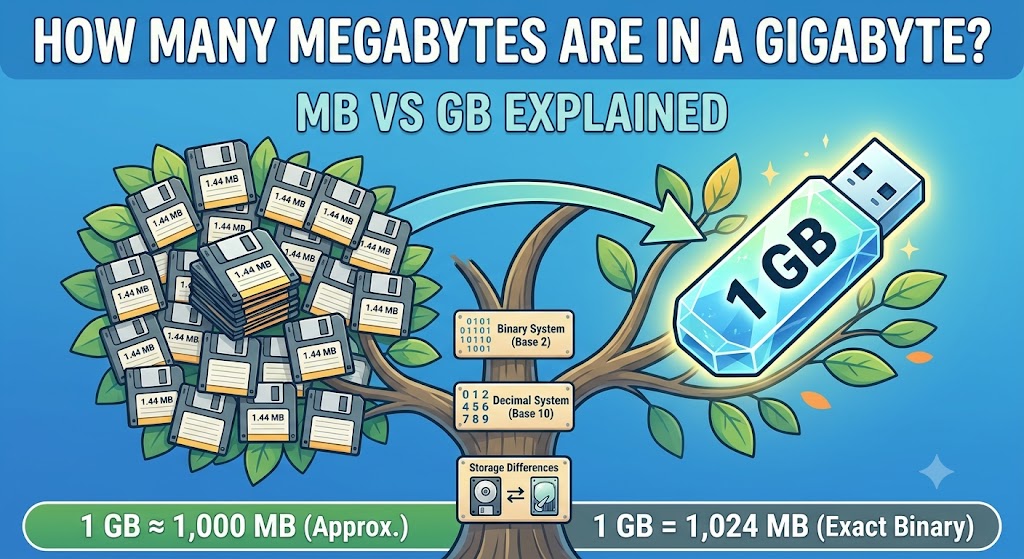
A gigabyte (GB) contains 1,000 megabytes (MB) when using the decimal measurement system commonly used for storage devices, file sizes, and data plans. However, binary-based calculations use 1,024 mebibytes (MiB) in one gibibyte (GiB). This difference explains why some calculators show 1,024 instead of 1,000 when discussing gigabytes and megabytes.
Understanding these measurements helps you compare phone storage, laptop capacity, internet data plans, application downloads, and digital files. For example, a 500 MB video takes up half a gigabyte under the decimal system, while a 2 GB storage allowance represents 2,000 MB. The exact amount displayed by your device can depend on its reporting conventions and the units used.
In this guide, you will learn how many megabytes are in a gigabyte, the difference between MB and GB, how to convert storage units, and how much data common files consume. You will also discover why your device may show less available storage than its advertised capacity and how to estimate the storage you need.
How Many Megabytes Are in a Gigabyte?
The simple answer is 1 GB = 1,000 MB. This is the decimal conversion used by storage manufacturers and commonly used for internet data measurements. However, binary-based calculations use a different set of units, which is why you may sometimes encounter the number 1,024.
The Simple Answer: 1 GB = 1,000 MB
In the decimal system, each storage unit is 1,000 times larger than the preceding unit. Therefore, one gigabyte contains 1,000 megabytes.
Here are some common conversions:
- 1 GB = 1,000 MB
- 2 GB = 2,000 MB
- 5 GB = 5,000 MB
- 10 GB = 10,000 MB
- 100 GB = 100,000 MB
These conversions are useful when comparing file sizes, estimating download requirements, and calculating storage capacity.
For example, if a software download is 1,500 MB, its size is 1.5 GB in decimal units. This calculation makes it easier to understand whether a file will fit within a particular storage allowance.
Why Some Calculators Use 1 GB = 1,024 MB
The number 1,024 comes from binary measurement, which is based on powers of two. Computers work internally with binary data, making powers of two important in memory addressing and many computing operations.
In older computing conventions, people commonly used the terms gigabyte and megabyte when referring to binary quantities. As a result, you may still encounter the statement that 1 GB equals 1,024 MB.
Technically, the correct binary units are gibibytes and mebibytes. One gibibyte contains 1,024 mebibytes, written as 1 GiB = 1,024 MiB.
This distinction matters when checking technical specifications, interpreting system reports, or comparing measurements that use different conventions.
GB vs GiB and MB vs MiB
MB and GB are decimal units, while MiB and GiB are binary units. Although the abbreviations look similar, they represent different quantities.
| Unit | Number of bytes |
| 1 kB | 1,000 bytes |
| 1 KiB | 1,024 bytes |
| 1 MB | 1,000,000 bytes |
| 1 MiB | 1,048,576 bytes |
| 1 GB | 1,000,000,000 bytes |
| 1 GiB | 1,073,741,824 bytes |
For everyday storage comparisons, the decimal conversion of 1 GB = 1,000 MB is usually the most straightforward. When a technical specification explicitly uses GiB or MiB, use the binary conversion instead.
What Is a Megabyte (MB)?
A megabyte is a unit used to measure digital information. It is commonly used to describe the size of photographs, documents, audio files, application downloads, and other digital content.
What Does MB Stand For?
MB stands for megabyte. In the decimal system, one megabyte equals 1,000,000 bytes.
A byte is a basic unit of digital information. Files contain data represented by bytes, and larger units make it easier to describe the amount of information a file contains.
For instance, describing a document as containing 2,000,000 bytes is less convenient than saying it is approximately 2 MB. That is why file managers, websites, applications, and download pages frequently display sizes in KB, MB, or GB.
Do not confuse MB with Mb. MB stands for megabyte, while Mb stands for megabit. A byte contains eight bits, so the two measurements are not interchangeable.
How Megabytes Measure File Size
File size indicates how much digital data a file contains. A small text document may occupy only a few kilobytes, while a high-resolution photograph or a short video may occupy several megabytes.
The amount of data depends on the content and how it is stored. A compressed JPEG photograph, for example, may be considerably smaller than an uncompressed image with the same dimensions. Similarly, an audio file encoded at a lower bitrate generally requires less space than a comparable file encoded at a higher bitrate.
The file format, resolution, compression method, and quality settings all influence the final size.
Examples of Files Measured in MB
Consider these illustrative examples:
- A simple text document may occupy less than 1 MB.
- A compressed photograph may occupy around 1–8 MB.
- A PDF containing images may occupy several megabytes or more.
- A song in a compressed audio format may occupy around 3–10 MB.
- A short video clip may occupy tens or hundreds of megabytes.
These are approximate examples, not fixed limits. A photograph can be smaller or larger depending on its resolution and compression. A PDF containing scanned pages may be much larger than a text-only document with the same number of pages.
MB is particularly useful when comparing individual files or estimating how much space a download will require.
What Is a Gigabyte (GB)?
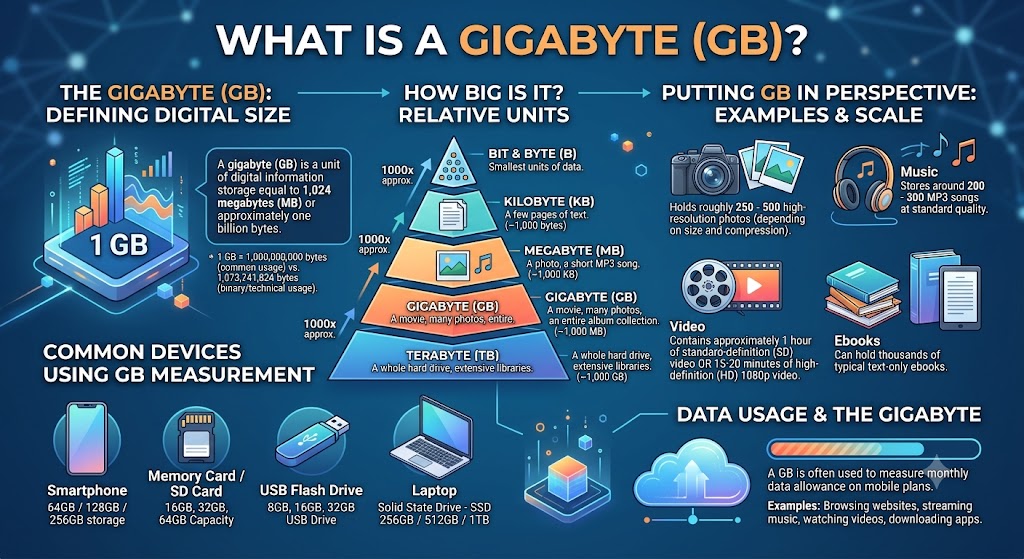
A gigabyte is a larger unit of digital information than a megabyte. It is commonly used to measure the storage capacity of phones, computers, external drives, memory cards, and cloud storage accounts.
What Does GB Stand For?
GB stands for gigabyte. In the decimal system, one gigabyte contains 1,000 megabytes or 1,000,000,000 bytes.
Because it represents a much larger amount of data than an MB, the gigabyte is more convenient for describing device storage and large downloads.
For example, a laptop with a 512 GB solid-state drive has substantially more storage capacity than a device with 64 GB of storage. The difference becomes important when installing applications, downloading games, saving photographs, and storing video files.
How Gigabytes Measure Storage Capacity
Storage capacity describes how much information a storage device can hold. A phone, laptop, USB drive, or external hard drive can store thousands of individual files, so manufacturers usually express the total capacity in gigabytes or terabytes.
For example, a device advertised with 256 GB of storage has a nominal decimal capacity of 256 billion bytes.
That does not mean all 256 GB will be available for your personal files. The operating system, preinstalled applications, system partitions, and other data may occupy part of the capacity.
It is also important to distinguish storage capacity from memory. A phone may have 256 GB of storage and 8 GB of RAM. Storage holds files and applications, while RAM supports tasks and data currently being used by the system.
Where Gigabytes Are Used in Phones, Laptops, and Drives
Gigabytes appear in several everyday situations.
Smartphones commonly offer storage capacities such as 64 GB, 128 GB, 256 GB, and 512 GB. Laptops and desktop computers may use SSDs with capacities ranging from hundreds of gigabytes to multiple terabytes. USB drives and memory cards also use GB to indicate how much data they can store.
Internet service providers and mobile operators may use GB to describe data allowances. In this context, GB refers to the amount of data you can transfer rather than the space available on a physical storage device.
Although the same unit is used, storage capacity and data usage describe different things. A 128 GB phone does not automatically include 128 GB of monthly internet data.
MB vs GB: What Is the Difference?
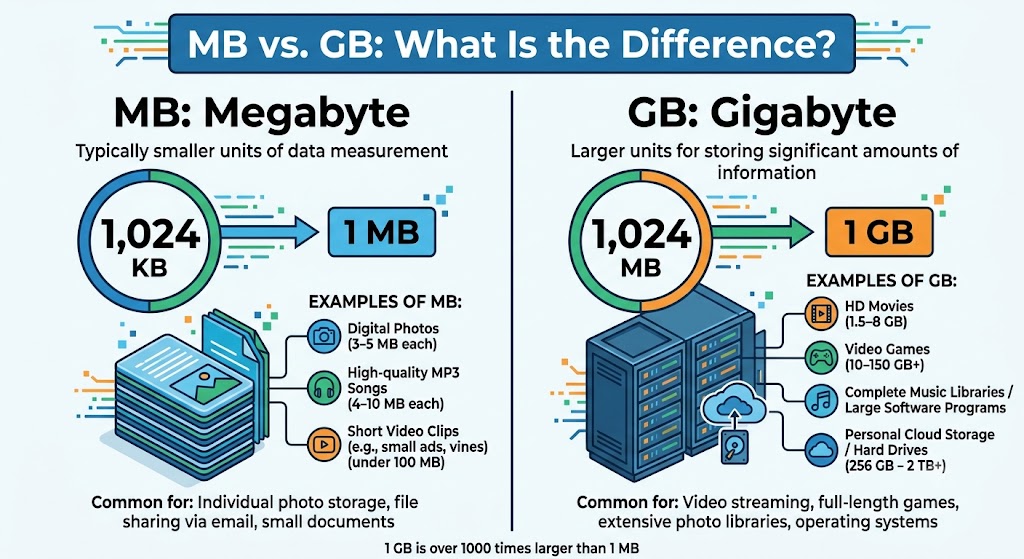
The primary difference between MB and GB is their size. A gigabyte represents 1,000 megabytes in the decimal system, making it the more suitable unit for describing larger amounts of data.
Understanding the distinction helps when downloading software, buying a storage device, selecting a phone, or comparing mobile data plans.
Which Is Bigger, MB or GB?
GB is bigger than MB. One gigabyte contains 1,000 megabytes under the decimal convention.
For example, a 2 GB video file would be approximately 2,000 MB. A 250 MB document collection would represent one-quarter of a decimal gigabyte.
The relationship works in both directions. To convert gigabytes into megabytes, multiply by 1,000. To convert megabytes into gigabytes, divide by 1,000.
Remember that this simple calculation assumes decimal units. If a specification uses GiB and MiB, the conversion factor is 1,024 instead.
Difference Between File Size and Storage Capacity
File size and storage capacity are related, but they describe different things.
File size tells you how much data a particular file occupies. Storage capacity tells you how much data a device can hold in total.
For example, suppose you have a laptop with 512 GB of advertised storage and a video file that occupies 2 GB. The video uses a small portion of the drive’s capacity. If your laptop already contains operating-system files, applications, photographs, and other downloads, however, the available free space will be lower than the original capacity.
When estimating whether a file will fit, check the available free space rather than relying only on the advertised drive size.
MB vs GB for Mobile Data and Downloads
Mobile operators commonly describe internet data allowances in GB, while individual downloads may be listed in MB.
Suppose your monthly data allowance is 10 GB and you download a 500 MB file. Under decimal measurements, the file represents 0.5 GB, or 5% of your allowance.
If you download a 1,500 MB application, it uses approximately 1.5 GB of data, assuming the displayed size represents the actual amount transferred. The real usage may differ because of updates, background activity, streaming quality, and additional downloads.
| Feature | Megabyte (MB) | Gigabyte (GB) |
| Decimal size | 1,000,000 bytes | 1,000,000,000 bytes |
| Relationship | Smaller unit | 1 GB = 1,000 MB |
| Typical use | Individual files and downloads | Device storage and data allowances |
| Example | A 5 MB photograph | A 128 GB phone |
| Common context | Documents, photos, small downloads | Applications, games, drives, monthly data plans |
Use MB when comparing relatively small files and GB when describing larger collections of data or storage capacity.
How to Convert Megabytes to Gigabytes
Converting megabytes to gigabytes is straightforward once you know which measurement system applies. The decimal system uses 1,000 MB per GB, while the binary system uses 1,024 MiB per GiB.
Convert MB to GB Using the Decimal System
To convert megabytes to gigabytes, divide the number of megabytes by 1,000.
Formula:
GB = MB ÷ 1,000
For example, if a download occupies 500 MB:
500 ÷ 1,000 = 0.5 GB
Therefore, 500 MB equals 0.5 GB.
The same method works for larger values. If a folder contains files totalling 3,200 MB, its decimal size is 3.2 GB.
You can also convert in the opposite direction by multiplying the number of gigabytes by 1,000.
For example:
2.5 GB × 1,000 = 2,500 MB
This calculation is useful when a website lists a download in MB but your storage device displays capacity in GB.
Convert MB to GiB Using Binary Units
Binary conversion requires extra care because MB and MiB are different units.
If the original measurement is expressed in MiB, convert it to GiB by dividing by 1,024.
Formula:
GiB = MiB ÷ 1,024
For example:
1,024 MiB ÷ 1,024 = 1 GiB
Similarly:
512 MiB ÷ 1,024 = 0.5 GiB
If your source specifically provides a value in decimal MB, you should not simply treat that number as MiB. Convert through bytes when you need an exact result.
For a decimal MB value, the conversion to GiB is:
GiB = (MB × 1,000,000) ÷ 1,073,741,824
This formula converts decimal megabytes into bytes and then divides by the number of bytes in a gibibyte.
Worked Conversion Examples
The following examples use decimal measurements unless otherwise stated.
| Megabytes (MB) | Calculation | Gigabytes (GB) |
| 100 MB | 100 ÷ 1,000 | 0.1 GB |
| 250 MB | 250 ÷ 1,000 | 0.25 GB |
| 500 MB | 500 ÷ 1,000 | 0.5 GB |
| 1,000 MB | 1,000 ÷ 1,000 | 1 GB |
| 1,500 MB | 1,500 ÷ 1,000 | 1.5 GB |
| 2,500 MB | 2,500 ÷ 1,000 | 2.5 GB |
| 5,000 MB | 5,000 ÷ 1,000 | 5 GB |
| 10,000 MB | 10,000 ÷ 1,000 | 10 GB |
These calculations work for file sizes, download estimates, and storage comparisons when the original measurements use decimal MB and GB.
The important step is to check the units before performing the calculation. If the source uses MiB and GiB, divide by 1,024 instead.
How Many Kilobytes and Bytes Are in a Gigabyte?
Kilobytes, megabytes, and gigabytes are all used to measure digital information. Bytes provide a common foundation for converting between them, but the conversion factors depend on whether the decimal or binary system is being used.
Bytes to Kilobytes, Megabytes, and Gigabytes
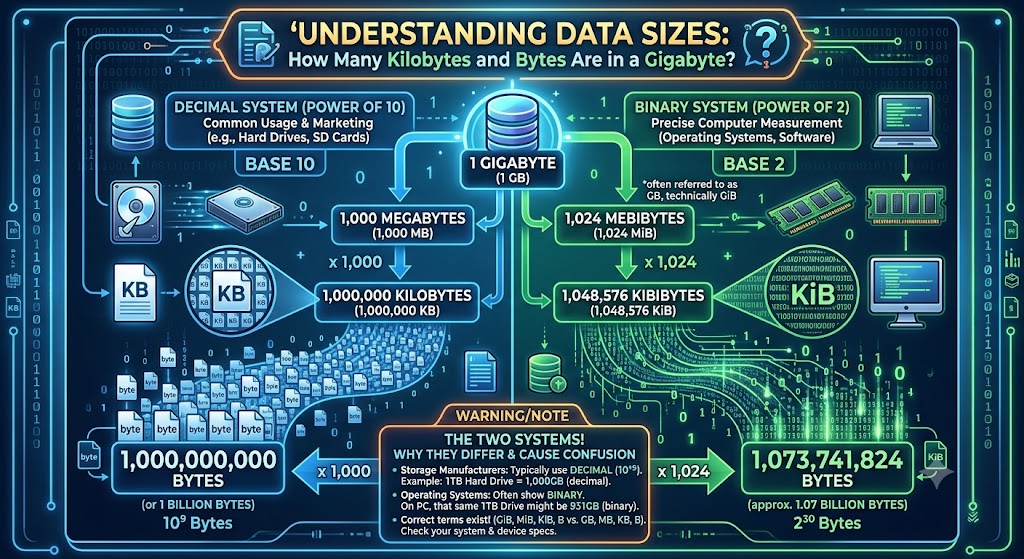
In the decimal system, each larger unit represents 1,000 times the preceding unit.
The standard decimal relationships are:
- 1 kB = 1,000 bytes
- 1 MB = 1,000 kB
- 1 GB = 1,000 MB
This means one gigabyte contains 1,000,000 kilobytes and 1,000,000,000 bytes.
In the binary system, each larger unit represents 1,024 times the preceding unit.
The binary relationships are:
- 1 KiB = 1,024 bytes
- 1 MiB = 1,024 KiB
- 1 GiB = 1,024 MiB
These distinctions are useful when interpreting technical specifications or comparing values reported by different applications.
How Many Kilobytes Are in a Gigabyte?
Under the decimal convention, one gigabyte contains 1,000,000 kilobytes.
The calculation is:
1 GB = 1,000 MB
1 MB = 1,000 kB
Therefore:
1,000 × 1,000 = 1,000,000 kB
In binary units, one gibibyte contains 1,048,576 kibibytes.
The calculation is:
1 GiB = 1,024 MiB
1 MiB = 1,024 KiB
Therefore:
1,024 × 1,024 = 1,048,576 KiB
The difference comes from the measurement system, not from a change in the underlying digital information.
How Many Bytes Are in a Gigabyte?
One decimal gigabyte contains exactly 1,000,000,000 bytes.
One gibibyte contains exactly 1,073,741,824 bytes.
To see how the decimal figure is calculated, start with the basic relationships:
1 kB = 1,000 bytes
1 MB = 1,000,000 bytes
1 GB = 1,000,000,000 bytes
Binary units follow a different calculation:
1 KiB = 1,024 bytes
1 MiB = 1,048,576 bytes
1 GiB = 1,073,741,824 bytes
The table below summarises both systems.
| Measurement | Decimal system | Binary system |
| Base unit | Byte | Byte |
| Kilobyte unit | 1 kB = 1,000 bytes | 1 KiB = 1,024 bytes |
| Megabyte unit | 1 MB = 1,000,000 bytes | 1 MiB = 1,048,576 bytes |
| Gigabyte unit | 1 GB = 1,000,000,000 bytes | 1 GiB = 1,073,741,824 bytes |
| Kilobytes per larger unit | 1 GB = 1,000,000 kB | 1 GiB = 1,048,576 KiB |
| Megabytes per larger unit | 1 GB = 1,000 MB | 1 GiB = 1,024 MiB |
The decimal system is common in storage-device specifications, while binary units are useful when an application explicitly reports quantities using KiB, MiB, or GiB.
How Much Can You Store in 1 GB?
One gigabyte can hold many documents, photographs, songs, and other files. However, the exact number depends on the file sizes, formats, and compression settings.
A useful starting point is to remember that 1 GB represents 1,000 MB in decimal measurements. You can then estimate how many files will fit by dividing 1,000 MB by the average size of each file.
For example, if a collection contains files averaging 5 MB each, 1 GB could theoretically hold around 200 such files before accounting for other storage requirements.
Photos and Screenshots
Photographs vary considerably in size. A compressed image taken on a phone may occupy around 1–8 MB, while a high-resolution image or RAW photograph may require considerably more space.
Using illustrative file sizes:
- At 2 MB per photograph, 1 GB holds approximately 500 photographs.
- At 5 MB per photograph, 1 GB holds approximately 200 photographs.
- At 10 MB per photograph, 1 GB holds approximately 100 photographs.
These figures are estimates based on dividing 1,000 MB by the assumed file size. Actual storage requirements may differ because of image dimensions, file formats, editing history, and compression.
Screenshots are often smaller than full-resolution photographs, particularly when they contain mostly text or simple graphics. However, detailed screenshots and images saved at higher resolutions can use more space.
If you regularly take photographs, consider the average size shown in your phone’s gallery or file manager rather than relying on a universal estimate.
Music, Podcasts, and Documents
Audio files can range from relatively small compressed recordings to larger, high-quality files. A compressed song might occupy 3–10 MB, depending on its length, format, and bitrate.
At an average of 5 MB per song, 1 GB could theoretically hold about 200 songs. If the average file size is 10 MB, the same storage could hold about 100 songs.
Podcasts vary by duration and encoding settings. A short episode may occupy only a few megabytes, while a long episode or higher-quality recording may require more space.
Text documents are generally much smaller. A simple document containing mostly text may occupy only tens or hundreds of kilobytes. Documents with many images, charts, embedded files, or scanned pages can be substantially larger.
This means 1 GB can hold thousands of simple text documents, but far fewer image-heavy reports or high-resolution scans.
Video Files and Downloads
Videos usually require more storage than text documents or compressed photographs because they contain a continuous sequence of images and often audio.
The size of a video depends on resolution, frame rate, duration, codec, bitrate, and compression settings. A short compressed clip may occupy tens of megabytes, while high-resolution footage can require hundreds of megabytes or several gigabytes.
For illustration, if a video occupies 250 MB, 1 GB can hold approximately four such videos under decimal measurements. If each video occupies 500 MB, the same capacity can hold approximately two.
Downloads also vary significantly. A small utility application may require only a few megabytes, while a large game or software package can require several gigabytes.
Remember that the downloaded file may not represent the application’s final installed size. Installation files, updates, temporary files, and additional content can increase the space required.
Apps, Games, and System Files
Applications vary widely in storage requirements. A basic calculator or note-taking application may be relatively small, while a game with detailed graphics, offline maps, or downloadable content can require several gigabytes.
Mobile applications may also store cached images, videos, and other temporary data. Messaging applications can accumulate large collections of media files over time.
System files and preinstalled software occupy additional storage on phones and computers. As a result, a device with a particular advertised capacity will not necessarily have that entire amount available for applications and personal files.
If you are planning to install a large game or professional application, check its current storage requirements and leave additional space for updates and temporary files.
Why Does My Device Show Less Storage Than Advertised?
Buying a device advertised with 128 GB or 512 GB of storage does not guarantee that the same numerical amount will appear as available free space. The difference usually comes from measurement conventions, system software, and the space already occupied by files.
Decimal Storage Measurements
Storage manufacturers commonly use decimal measurements. Under this system, a 512 GB drive contains 512,000,000,000 bytes.
If a computer reports the same number of bytes using binary gibibytes, the calculation is:
512,000,000,000 ÷ 1,073,741,824 ≈ 476.84 GiB
Therefore, a drive advertised as 512 GB may correspond to approximately 476.84 GiB when the same capacity is expressed in binary units.
This is a difference in measurement, not necessarily a loss of physical storage. However, the precise number displayed by an operating system depends on its reporting conventions.
Operating-System Reporting Conventions
Operating systems and utilities do not always display storage using the same labels or conventions. Some interfaces use decimal units, while others use binary quantities or display rounded figures with familiar labels.
This can make comparisons confusing. Two applications may report different-looking values for the same underlying storage capacity because they use different units or rounding rules.
When comparing specifications, check whether the values are expressed in GB and MB or in GiB and MiB. Comparing the same unit system avoids unnecessary confusion.
Space Occupied by System Files and Preinstalled Software
The difference between advertised capacity and available free space also includes the storage used by the operating system, preinstalled applications, recovery partitions, and other system components.
For example, a laptop advertised with a 512 GB drive may show a smaller capacity when expressed in binary units. After the operating system, applications, and personal files are accounted for, the available free space will be smaller still.
These are three separate measurements:
- Advertised capacity: The manufacturer’s stated storage capacity, usually expressed in decimal units.
- Reported capacity: The capacity displayed by the operating system, according to its measurement conventions.
- Available free space: The amount of storage currently available for new files.
To check the space you can actually use, open your device’s storage settings or file manager. This is more useful than relying only on the number printed on the product box.
How Many GB Do You Need?
The right storage capacity depends on what you do with your phone or computer. A person who mainly uses messaging applications and browses the web has different requirements from someone who records high-resolution videos or installs large games.
Instead of choosing a capacity based on a single general recommendation, estimate your existing storage use, future requirements, and the amount of free space you want to maintain.
Storage for Basic Phone Use
If you mainly use messaging applications, browse websites, read documents, and take occasional photographs, your storage requirements may be relatively modest.
However, even basic phone use can accumulate data over time. Messaging applications save photographs and videos, browsers store cached files, and operating systems need room for updates.
Review your phone’s storage settings to identify the categories using the most space. Removing unnecessary downloads or transferring older photographs to another storage location can help you make better use of your existing capacity.
Before buying a phone, consider how long you intend to keep it and whether your usage is likely to grow.
Storage for Photos and Video
People who regularly take photographs or record videos may benefit from additional storage. High-resolution photographs and long video recordings can consume space much faster than text documents.
Estimate your average monthly storage use by checking how much space your media occupies over a typical month. Multiply that figure by the number of months you expect to keep the device before transferring or deleting files.
For example, if new photographs and videos occupy 8 GB per month, six months of similar usage would require approximately 48 GB, before accounting for applications, system files, and other content.
If you prefer to keep years of photographs and videos on the device, plan for a larger collection. Cloud storage, an external drive, or another backup arrangement may help, provided you have enough capacity and a suitable backup strategy.
Storage for Gaming and Professional Work
Gaming and professional work can require more storage than ordinary browsing or document editing.
Modern games may occupy tens or even hundreds of gigabytes, particularly when they include high-resolution assets, downloadable content, and frequent updates. Video editing projects, large design files, virtual machines, development environments, and local datasets can also consume substantial space.
Before purchasing a device, check the storage requirements of the specific software you intend to use. Consider the size of installed applications as well as the working files and temporary data they create.
If you use several large applications at once, extra capacity can reduce the need to uninstall software or move files frequently. For professional workloads, also consider drive speed, backup requirements, and whether the storage can be upgraded.
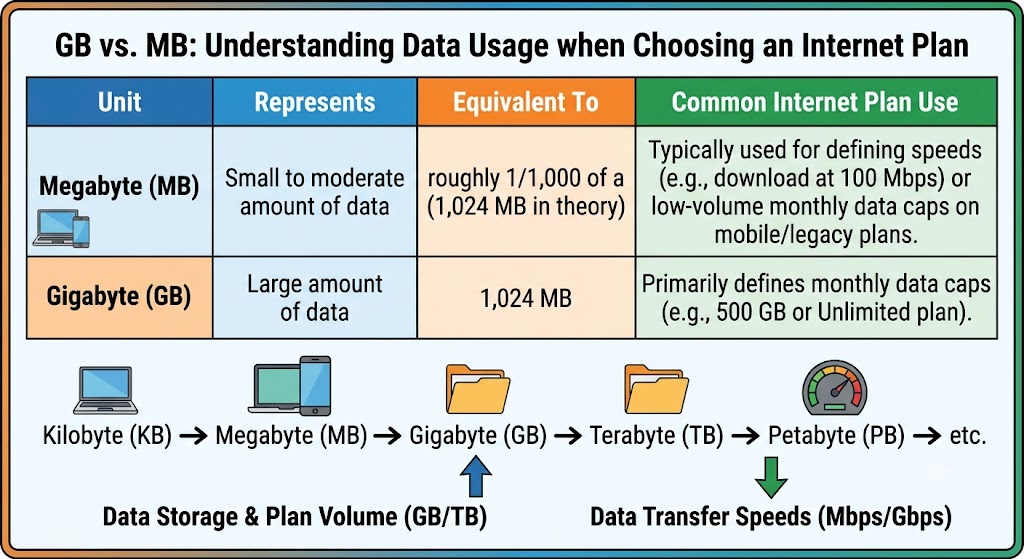
GB vs MB When Choosing an Internet Plan
Storage capacity and internet data allowances both use MB and GB, but they measure different things.
A 10 GB mobile data plan represents approximately 10,000 MB of data under decimal measurements. A 500 MB download would account for roughly 5% of that allowance if the displayed download size corresponds to the amount of data transferred.
However, browsing, video streaming, application updates, video calls, and background synchronisation also consume data. A plan that suits someone who mainly sends text messages may be insufficient for someone who streams video every day.
Estimate your usage from your phone’s mobile-data settings or your operator’s usage records. Then consider whether your current consumption is likely to change.
When comparing plans, check the data allowance, validity period, speed restrictions, and any fair-use conditions. The number of GB alone does not tell you everything about the service.
Frequently Asked Questions About MB and GB
1. Is a Megabyte Bigger Than a Gigabyte?
No. A gigabyte is larger than a megabyte. Under the decimal system, 1 GB equals 1,000 MB.
For example, a 5 GB file represents 5,000 MB. This relationship is useful when comparing downloads, storage capacities, and data allowances.
In binary measurements, 1 GiB equals 1,024 MiB. The distinction between decimal and binary units explains why some technical references use different conversion factors.
2. How Many MB Are in 2 GB?
There are 2,000 MB in 2 GB under the decimal system.
The calculation is:
2 × 1,000 = 2,000 MB
If the measurement is expressed in binary units, 2 GiB equals 2,048 MiB.
Always check whether the original measurement uses GB and MB or GiB and MiB before applying a conversion.
3. How Many MB Are in 10 GB?
Ten gigabytes equal 10,000 megabytes under decimal measurements.
The calculation is:
10 × 1,000 = 10,000 MB
This conversion is useful when estimating download sizes or comparing a file collection with a storage capacity.
Under binary measurements, 10 GiB equals 10,240 MiB. These figures differ because the two systems use different conversion factors.
4. How Many KB Are in 1 GB?
One decimal gigabyte contains 1,000,000 kilobytes when using the decimal units kB and GB.
The calculation is:
1 GB = 1,000 MB
1 MB = 1,000 kB
Therefore, 1 GB = 1,000,000 kB.
In binary measurements, one gibibyte contains 1,048,576 kibibytes. The correct binary abbreviations are GiB and KiB.
5. How Many Bytes Are in a GB?
One decimal gigabyte contains 1,000,000,000 bytes.
This is calculated by multiplying the decimal units:
1 GB = 1,000 MB
1 MB = 1,000,000 bytes
Therefore, 1 GB = 1,000,000,000 bytes.
One gibibyte, by comparison, contains 1,073,741,824 bytes. This difference is important when interpreting storage specifications and technical reports.
6. Is GB the Same as GiB?
No. GB and GiB are different units.
GB stands for gigabyte and equals 1,000,000,000 bytes in the decimal system. GiB stands for gibibyte and equals 1,073,741,824 bytes in the binary system.
Similarly, MB and MiB are different. One MB contains 1,000,000 bytes, while one MiB contains 1,048,576 bytes.
Although people sometimes use the terms interchangeably in casual conversation, keeping the units distinct produces more accurate calculations.
7. What Does MB Mean on a Phone?
MB on a phone usually stands for megabyte. It may describe the size of a photograph, video, document, application download, or amount of mobile data consumed.
For example, a 20 MB file occupies approximately 0.02 GB under decimal measurements. If your mobile plan has a 5 GB allowance, that file represents around 0.4% of the allowance, assuming the displayed size matches the data transferred.
The context matters. MB used for file storage describes the size of a file, while MB used in mobile-data settings describes the amount of data consumed or transferred.
8. How Much Is a Gigabyte of Mobile Data?
One gigabyte of mobile data represents approximately 1,000 MB under decimal measurements. It can support different amounts of browsing, messaging, downloading, or streaming depending on how the data is used.
Text-based messaging and lightweight browsing generally consume less data than high-resolution video streaming or downloading large files. Video quality, application settings, automatic updates, and background activity can also influence usage.
Rather than relying on a fixed estimate of how long 1 GB will last, check your phone’s mobile-data usage statistics. These records can help you estimate how much data your activities consume and choose an appropriate plan.
Conclusion
A gigabyte contains 1,000 megabytes under the decimal system commonly used for storage devices and data allowances. In binary measurements, one gibibyte contains 1,024 mebibytes. Understanding this distinction helps you convert file sizes, compare storage capacities, estimate download requirements, and understand why devices may display different-looking values. Before calculating, check whether the original measurement uses MB and GB or MiB and GiB. For everyday conversions, divide MB by 1,000 to obtain GB, and multiply GB by 1,000 to obtain MB.