
You may think your store looks put together, but your ecommerce storage could be all over the place.
There are piles of boxes in the basement or garage. You can’t seem to find the items you sell the most because everything is jumbled together.
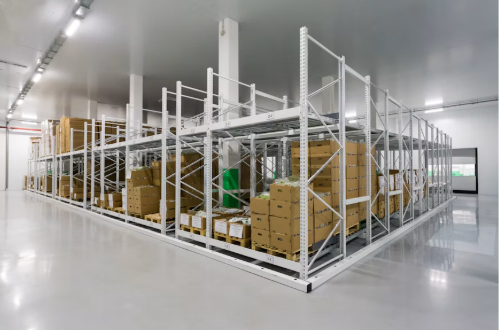
By having proper ecommerce storage, you will be able to store all of your stock in an efficient manner. There should be a designated location for all of your stock to help streamline the shipping process.
This article covers:
- What type of storage to use and how much space you need
- Syncing your stock with your ecommerce store
- Improving your shipping process
Find the Storage Bottleneck First
Identify where your current storage method is failing you.
- Do you not have enough room for your stock?
- Are you storing all of your products together?
- Do the stock levels in your online store match what you actually have in storage?
If you have clean boxes and storage but your stock counts are inaccurate, you will not benefit from ecommerce storage. Having good inventory management software will only be helpful if you follow a system to store your products.
Do an inventory of your products and see what you currently have in storage. Take note of what you sell the most and where they are stored.
Once you receive your next few orders, see how long it takes you to ship them. There are probably many wasted steps that you can cut out from your shipping process.
Pick an Ecommerce Storage Solution That Fits
Depending on how you sell, you will want to consider these options:
- Storing your stock at home. Many small sellers can manage with a stockroom at their house. Make sure you have your main items you sell close by and have extra stock or cartons stored out of the way.
- Mini Storage. You can always store some of your stock in a mini storage unit. If you’re searching for “mini storage near me,” you can compare nearby options using sparefoot.com/near-me/mini-storage.
- Workspace. If you are shipping out many orders a day, you may want to invest in a workspace.
- Hire a company. Once your store reaches a certain amount of orders, it can be beneficial to have a company store your stock and fulfill orders for you.
Something to note is that there is a difference between storing your stock and fulfilling orders.
Some storage facilities will allow you to store items for your business but not work in the unit. Make sure to clarify with the facility if they will allow employees, shipment pickups or customers to come to the location.
Choose a solution that works best for your business needs.
Give Every Product a Physical Address
Make sure you aren’t just randomly stuffing your stock anywhere there is room. Break down your storage area into multiple locations and assign a spot for each product.
For example, divide your space into receiving, active stock, reserve stock, packing supplies, and returns.
Place frequently ordered products close to the front; keep heavy cartons low; store the heaviest boxes on lower shelves; and leave enough room to reach items without moving three other boxes first.
Label each shelf with a location number or letter. Once you assign each item to a shelf, add that information next to the product’s stock keeping unit (SKU).
Keep any broken items or unconfirmed items away from your current stock and always update your stock levels when an item comes in or leaves your location.
Now your store and your stock location are connected.
Make Your Digital Stock Match Reality
Just like you have physical stock, you also need to stay on top of your digital stock.
If you sell on multiple platforms, try to find an inventory management software that can help with updating your stock levels.
- Receiving: Once your stock comes in, count your items and add them to your software. If any items are the wrong variation or damaged, remove them from your current stock and place them in a location you have assigned for that scenario.
- Cycle Counts: It’s always a good idea to cycle count your stock every so often. This can be done by picking a few shelves and counting all the items on those shelves. If you find an error, fix it right away and look into why there was a discrepancy.
- Stock Availability: Always know what stock you have available to sell. Some stock may be sitting in storage or on hold for another order.
Having accurate stock levels will allow you to order stock when you need it and fulfill orders that your stock can handle.
Build a Simple Pick, Pack, and Ship Routine
By organizing your ecommerce storage, you can help speed up your shipping process.
- Pick your items by grouping your orders together and making a pick sheet. Include your SKU, how many you need to ship and where the item is located. This can reduce repeat trips while collecting items for orders.
- Pack your order by verifying the items against your order. Have all your boxes, packing materials and labels near your pack station. Only pack orders inside a storage unit if the facility permits it.
- Once the order is packed, mark it as packed. Record the shipment when the parcel is handed to the carrier. Just because you printed a label does not mean your package left your facility.
If you have backstock stored at a mini storage unit, make sure to have some at your shipping location. This will save you time if you need to ship more than what you currently have on hand.
A repeatable picking, packing and shipping routine can make delays easier to spot and reduce avoidable work.
Leave Room for Returns and Growth
When selling online, you’ll have items coming in and items coming back.
The National Retail Federation estimated that 19.3% of online sales would be returned in 2025, so you should have space for your items to come back as well.
Set aside a location for your returns and inspect the item once it comes back. If you decide to keep the item in your current stock, update your software with the item returning.
Make Storage Work for Your Store
As your business grows, you should always evaluate your storage location. Ask yourself how many times you ran out of room, how long it took you to pick your items and how much time you spent driving back and forth to your storage location.
You may want to rent an additional unit or even invest in a larger space to accommodate your needs.