
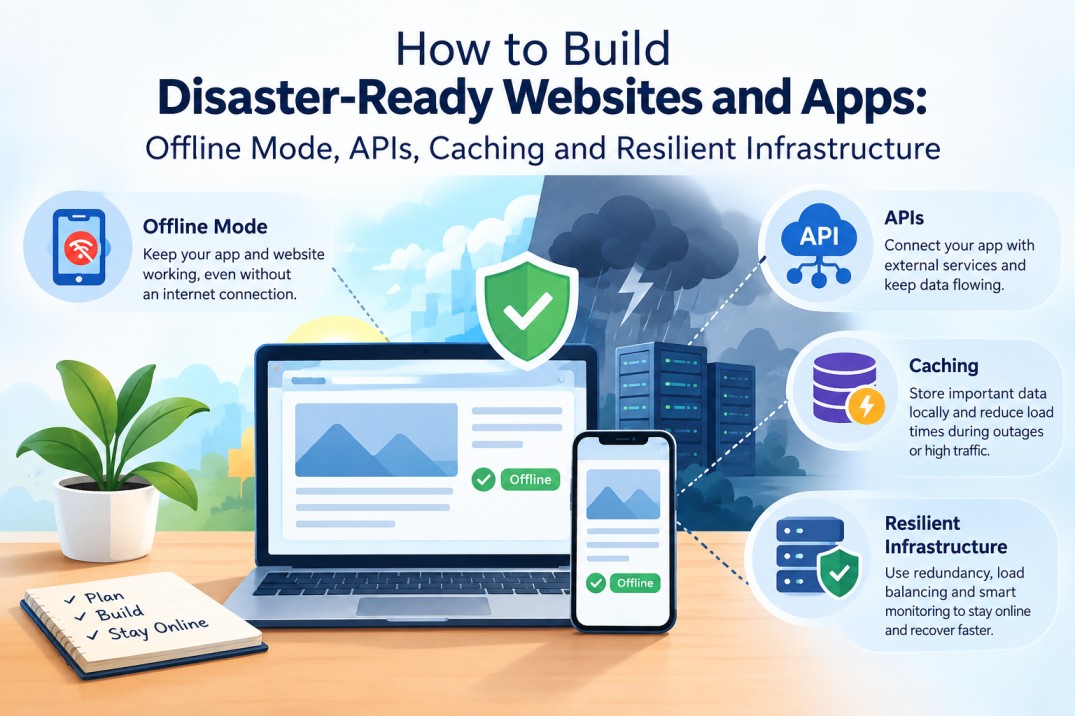
Imagine a flood has cut power to a town.
The mobile network is unstable. Internet access comes and goes. A relief worker is standing outside a shelter, trying to register families, check available supplies and send an update to the central team.
They open the disaster management app.
It keeps loading.
Then it displays: “No internet connection.”
That tiny message can turn a useful application into a useless one at exactly the moment it is needed most.
This is the part of emergency technology that receives surprisingly little attention. Governments and organisations may invest heavily in sensors, satellite imagery, emergency communication systems and data platforms, yet the final interface people depend on can still assume that electricity, broadband and stable connectivity will always be available.
A disaster-ready website or application starts from the opposite assumption.
The network will fail. The power may fail. The server may become unreachable. Users may reconnect for only a few seconds at a time. The application must still do something useful.
That changes how the software is designed.
Disaster-Ready Software Begins With an Uncomfortable Question
Most websites are designed around a simple sequence:
User → Internet → Server → Database → Response
That architecture works beautifully when everything is available.
During a disaster, any part of that chain can break.
The user might have no connection. The API might be unreachable. The database may be temporarily unavailable. A cloud service might experience an outage. DNS could fail. A mobile device could lose power before synchronisation finishes.
A resilient web application therefore needs another sequence:
User → Local application → Local data → Network when available → Server → Synchronisation
The difference is fundamental.
The application does not treat the internet as its foundation.
It treats the internet as one available communication path.
The best emergency application is not the one that works perfectly online. It is the one that remains useful when online stops being reliable.
What Does a Disaster-Ready Website Actually Mean?
A disaster-ready website is not simply a website hosted on a powerful cloud server.
It is a system designed to continue providing critical functions when parts of its infrastructure become unavailable.
Depending on its purpose, that could mean allowing users to:
- Access previously downloaded emergency information.
- View maps or instructions without connectivity.
- Record information while offline.
- Submit forms and queue them for later transmission.
- Search locally stored shelter or contact information.
- Continue using essential application features during temporary outages.
- Automatically synchronise information when connectivity returns.
This is particularly important for emergency web development because users may be operating under completely different conditions from ordinary website visitors.
A normal customer can wait for a page to reload.
A field worker documenting flood damage may not have that luxury.
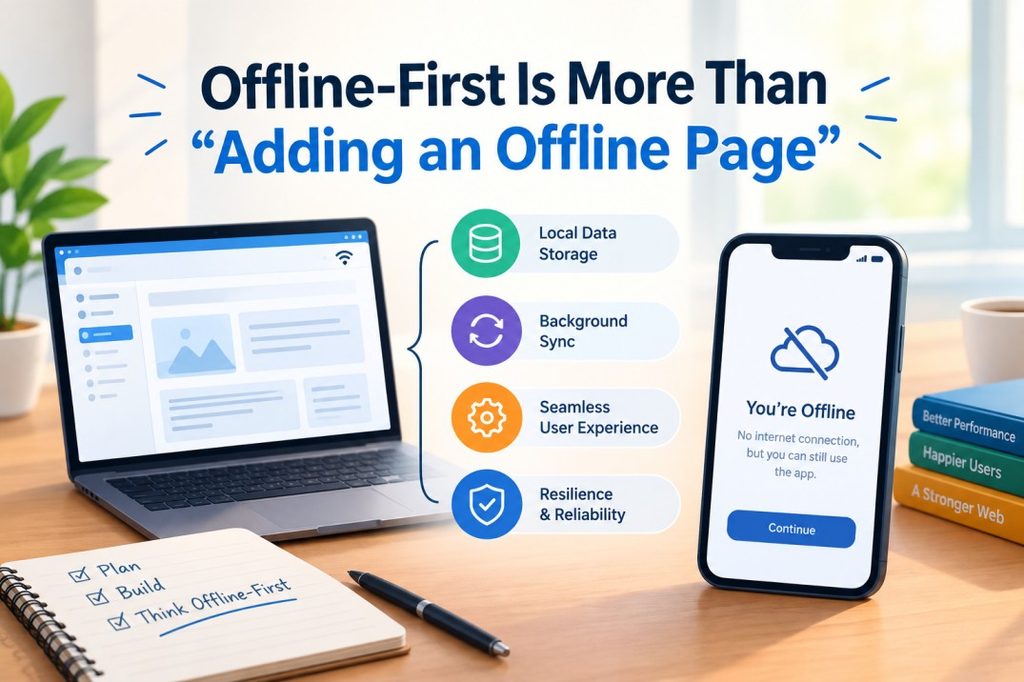
Offline-First Is More Than “Adding an Offline Page”
One common misunderstanding is that offline support means showing a message such as:
“You’re offline. Please try again later.”
That is not offline-first architecture.
An offline-first application assumes that connectivity is intermittent and designs the application around that reality.
Instead of asking:
“What should the app do when there is no internet?”
developers ask:
“Which parts of the app should continue working even when there is no internet?”
That question produces a completely different design.
For example, consider a flood-response application used to record damaged houses.
A responder arrives at a location with no signal. The application should still allow them to:
- Open the form.
- Enter the household information.
- Capture photographs.
- Record GPS coordinates if available.
- Add notes.
- Save the record locally.
- Clearly mark it as pending synchronisation.
When the connection returns, the application can send the stored records to the central system.
The responder does not have to stand in a flooded area waiting for an API request to succeed.
The Four Building Blocks of an Offline-First Web App
A robust offline web app usually depends on several technologies working together rather than one magical feature.
1. Service workers
Service workers can intercept network requests and control how an application responds when connectivity is unavailable.
They can help deliver previously cached application resources, allowing important parts of a progressive web application to open without making a fresh request to the server.
For disaster applications, this could include the application’s interface, emergency instructions, forms and other carefully selected resources.
2. Local storage
Critical information can be stored on the device instead of requiring a server request every time.
Depending on the data requirements, technologies such as IndexedDB can store considerably more structured information than simple browser storage.
This is useful for offline forms, records, reference information and synchronisation queues.
3. Caching
Caching allows frequently required resources to remain available locally.
But disaster applications should not simply cache everything.
A developer needs to distinguish between:
- Static information that can safely remain available for longer.
- Frequently changing information that needs updating.
- Critical real-time information that should never be presented as current when it is actually old.
That last category is particularly important.
Showing yesterday’s evacuation information without clearly indicating its age could be worse than showing nothing.
4. Synchronisation
When connectivity returns, locally stored information needs to reach the central system.
This requires careful handling of:
- Failed requests
- Duplicate submissions
- Partial uploads
- Conflicting edits
- Timestamps
- Device identifiers
- Authentication
- Data integrity
A simple “send everything when online” approach can create serious problems if the network disappears halfway through the process.
APIs Need to Expect Failure
APIs are the invisible plumbing behind many disaster management software systems.
A web application may use APIs to retrieve:
- Weather information
- Flood levels
- Shelter availability
- Road conditions
- Emergency contacts
- Rescue-team locations
- Inventory information
- Incident reports
Under normal conditions, an API request might take a fraction of a second.
During a disaster, it might take thirty seconds.
Or two minutes.
Or fail completely.
A resilient API architecture therefore needs to treat failure as normal rather than exceptional.
Useful techniques include:
Timeouts: Do not allow a failed request to keep the interface hanging indefinitely.
Retries: Retry temporary failures carefully rather than sending dozens of identical requests.
Exponential backoff: Increase the delay between repeated attempts so a struggling server is not overwhelmed.
Idempotency: Make important operations safe to retry without accidentally creating duplicate records.
Queueing: Store requests locally and transmit them later when the connection becomes available.
Graceful degradation: If live data cannot be retrieved, continue providing whatever reliable local functionality remains available.
This is where emergency web development differs from ordinary feature development.
The developer is not designing only for success.
They are designing for partial failure.
Caching Can Become a Lifeline
Consider an emergency website containing evacuation instructions, shelter locations and basic safety information.
If every page requires a live server request, the website may disappear for users as soon as the connection becomes unreliable.
A better approach can pre-cache critical resources.
When the user has connectivity, the application downloads essential content. Later, if the network disappears, that information remains available locally.
This is particularly useful for a PWA disaster response system.
A Progressive Web App can provide an app-like experience through the browser while supporting capabilities such as service workers, caching and installation on compatible devices.
But there is an important design rule:
Cache information deliberately, not indiscriminately.
A ten-day-old shelter capacity figure should not quietly look like a current one.
A disaster-ready application should therefore show information freshness clearly.
For example:
Shelter capacity: 38 people
Last updated: 11:42 AM
That timestamp can be operationally more important than the design of the screen itself.
When the Internet Returns, Synchronisation Begins
Offline systems create a second problem that developers sometimes underestimate.
Suppose five rescue workers independently collect information while disconnected.
All five devices eventually reconnect.
Now the system needs to decide:
- Which records are new?
- Which records were already uploaded?
- Did two users update the same record?
- Is one photograph missing?
- Did the user submit the form twice?
- Which timestamp should be trusted?
- What happens if the server accepts half the data before the connection fails again?
This is why offline-first architecture needs a proper synchronisation strategy from the beginning.
A useful model is to give every offline action a unique identifier.
The device stores the action locally.
When connectivity returns, the server receives the operation.
The server acknowledges successful processing.
The client removes the operation from its queue only after confirmation.
If the connection fails, the operation remains queued.
This sounds simple, but it prevents a dangerous situation where the user sees an error and submits the same emergency record repeatedly.

Design the Interface for Stress, Not Just Screens
Technical resilience is only half the problem.
A disaster application may be used by people who are tired, distracted, frightened or working outdoors in poor conditions.
That changes interface design.
Emergency interfaces should generally prioritise:
- Large, obvious actions.
- Minimal navigation.
- Clear status indicators.
- Strong confirmation messages.
- Simple language.
- Fast loading.
- Important information visible without unnecessary interaction.
- Clear distinction between current and cached information.
An offline form should not leave the user wondering whether their report was saved.
Instead, the application could display:
Saved on device — waiting for connection
That one status message prevents the user from repeatedly entering the same information.
A useful emergency status model
| Status | Meaning |
| Saved locally | Data is safely stored on the device |
| Waiting to sync | Data has not reached the server |
| Syncing | Upload is currently being attempted |
| Synced | Server confirmed receipt |
| Needs attention | User intervention is required |
Good disaster software communicates its own condition.
What Happens When the Server Goes Down?
Offline support protects users from network failure, but resilient infrastructure needs to address the other side of the system too.
A disaster-ready backend should consider:
Redundancy
Critical services should not depend unnecessarily on a single server or location.
Backups
Backups need to exist independently enough that a failure affecting the primary environment does not destroy the backup as well.
Monitoring
Teams need to know when an important service is failing rather than discovering the problem from user complaints.
Rate limiting
A sudden surge of users should not allow one service to consume every available resource.
Disaster recovery
Organisations need documented procedures for restoring critical services, not simply backups sitting somewhere untouched.
Cloud infrastructure can provide powerful resilience features, but “it’s on the cloud” is not itself a disaster-recovery strategy.
The architecture still needs deliberate decisions about redundancy, recovery objectives, backups, access control and dependencies.
Build for Intermittent Connectivity, Not Just No Connectivity
One of the most useful design insights is that disasters rarely produce a clean online/offline switch.
Connectivity may behave more like this:
Online → slow → intermittent → offline → weak signal → online for 20 seconds → offline again
That means applications should be able to operate across unstable transitions.
For example, a field worker may get connectivity for only 15 seconds.
The application should use that window intelligently.
Small queued requests can be sent first. Large photographs can be compressed or uploaded later. Critical text data can receive higher priority than non-essential media.
This creates a form of communication triage inside the application.
Not every piece of data deserves the same priority.
A Practical Architecture for Disaster-Ready Applications
A basic architecture could look like this:
User device
↓
PWA / offline-first interface
↓
Local cache + IndexedDB + sync queue
↓
API gateway
↓
Application services
↓
Database + object storage
Alongside this, the system can include monitoring, authentication, backups, analytics and external data sources.
The important feature is that the local layer does not disappear when the API becomes unreachable.
The application can continue operating in a reduced but useful state.
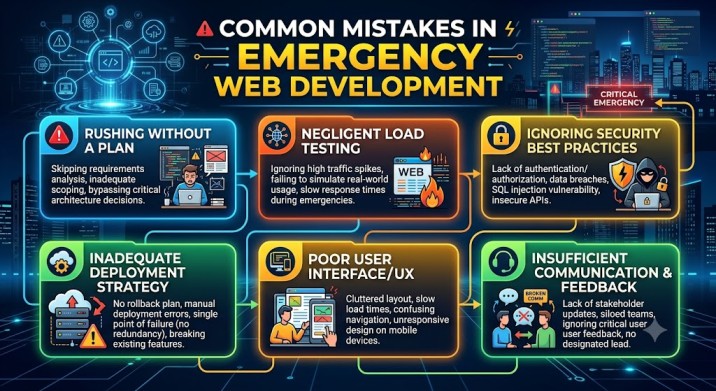
Common Mistakes in Emergency Web Development
Mistake 1: Treating offline support as an afterthought
If offline functionality is added after the application is finished, fundamental assumptions may already depend on constant connectivity.
Mistake 2: Caching everything
More cached data does not automatically mean a better disaster application. Outdated information can create dangerous decisions.
Mistake 3: Ignoring synchronisation conflicts
Multiple people may edit the same information while disconnected. Conflict resolution needs to be designed, not improvised later.
Mistake 4: Forgetting the battery
An offline application still runs on a physical device. Heavy maps, constant GPS usage and large uploads can drain batteries quickly.
Mistake 5: Making the interface too complicated
A disaster application is not the place to showcase every feature the product team has imagined. Critical workflows should remain fast and obvious.
Mistake 6: Assuming cloud hosting solves everything
Cloud services can improve resilience, but an application can still fail because of a bad deployment, a single-region dependency, a broken API, expired credentials or a third-party service outage.
The Best Disaster-Ready App Knows When to Become Simpler
This may be the most important principle of all.
During normal conditions, an application can offer maps, live dashboards, analytics, photographs, notifications and dozens of interconnected features.
During a disaster, the priority changes.
If the live dashboard fails, perhaps the application should still show the last verified information.
If the map tiles cannot load, perhaps previously downloaded critical areas remain available.
If the API is unreachable, the user should still be able to record an incident.
If synchronisation fails, the application should preserve the data rather than throwing it away.
Resilience is therefore not about maintaining 100% of functionality.
It is about preserving the most important functionality first.
The Real Test: Pull the Plug
A disaster-ready website should not be judged only in a normal demonstration.
Test it under failure.
Turn off the internet.
Restart the device.
Throttle the connection.
Kill the API.
Delay requests.
Let a synchronisation attempt fail halfway through.
Fill the local storage.
Send duplicate submissions.
Change the same record on two devices.
Then ask:
Can the user still accomplish the most important task?
If the answer is no, the application may look modern, but it is not truly resilient.
Building Software That Assumes the World Is Imperfect
Disaster management software is ultimately a lesson in software engineering itself.
Real networks fail. Servers fail. batteries die. cables are cut. users make mistakes. APIs time out. Data arrives late. Systems recover at different speeds.
A disaster simply exposes these weaknesses faster and with higher consequences.
That is why offline-first web development has value far beyond floods and earthquakes. The same principles can make applications more dependable in rural areas, remote worksites, poor-connectivity regions and everyday network outages.
For emergency systems, however, the stakes are higher.
A resilient web application does not promise that technology will never fail.
It is designed so that one failure does not become a complete loss of capability.
That means caching the information people cannot afford to lose, storing actions locally when servers cannot be reached, synchronising carefully when connectivity returns, building APIs that expect failure and creating infrastructure with genuine recovery paths.
The strongest disaster-ready website may therefore be the one that looks surprisingly ordinary during a crisis.
The user taps a button.
The form opens.
The information is saved.
The connection disappears.
Nothing breaks.
And when the network finally returns, the work continues exactly where it left off.